Unable to render embedded object: File (books.jpg) not found.
Go to documentation repository

Page History
To create a new map , complete the following steps:
- Click
 in the bottom left corner of the screen or click and select Add map from the context menu of the Layouts ribbon.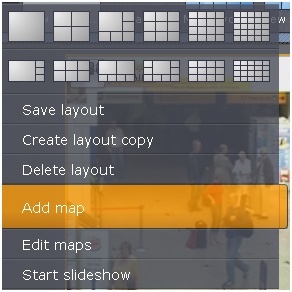
- Enter the map's name (1) and choose the picture that will be used as a blueprint of the guarded facility(2).
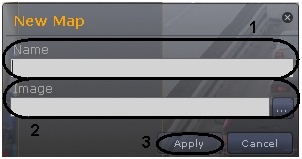
- Click Apply (3).
You have created a new map and opened it in the editing mode. To leave the editing mode click Apply.

| Info | ||
|---|---|---|
| ||
| To leave the editing mode, go to the context menu of the Layouts ribbon and click Save map. |
You have created a new map.
Overview
Content Tools