


Page History
To configure the Apple TV Client, do the following:
- Enable the Hide editing option Readonly option (1) to hide the ability to edit and delete servers.

- Disable the Show demo servers option (2) to hide the demo servers.
- In the Mode field (3), select the video playback mode:
- MJPEG (internal);
- RTSP (vlc);
- MP4 (vlc).
- In the Video Resolution field (4), select the video resolution:
- Max;
- 1080p HD;
- 720p HD;
- 576p 4CIF;
- 288p CIF.
- In the Preview QualityResolution field (5), select the video preview quality:
- Max;
- 576p 4CIF;
- 288p CIF.
- In the Frames/sec FPS field (6), select the frame rate for video playback:
- Max;
- 12;
- 6;
- 3.
- Disable the Show warnings option warning option (7) to hide warnings (for example, about connecting to the Server of an older version).
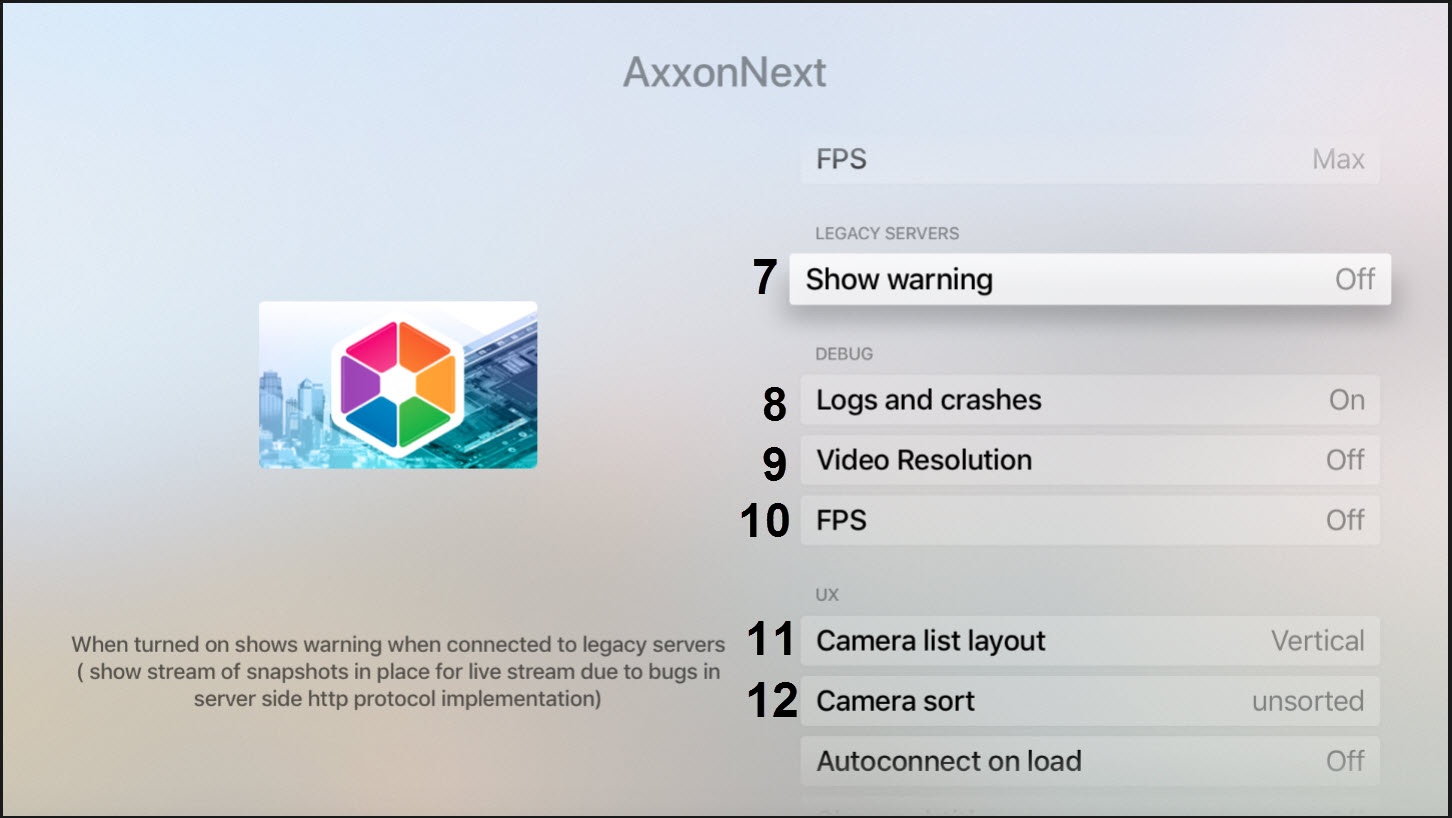
- In case of an unexpected Apple TV Client shutdowncrash, a report is generated and automatically sent to AxxonSoft for analysis. To disable the report sending, disable the Logs and Shutdownscrashes option (8).
- By default, the video resolution and frame rate are displayed in the video frame. To disable the displaying of this information, disable the Video Resolution (9) and Frames/sec FPS (10) options.
- In the Layout Camera list layout field (11), select the multiplier scroll orientation:
- Vertical;
- Horizontal;
- Fit everything.
- In the Camera sort field (12), select the cameras sorting way:
- by name;
- by id;
- unsorted.
- Enable the Connect Autoconnect on launchload option (13) to allow the Apple TV Client to automatically connect to the most recent Server when it launches.
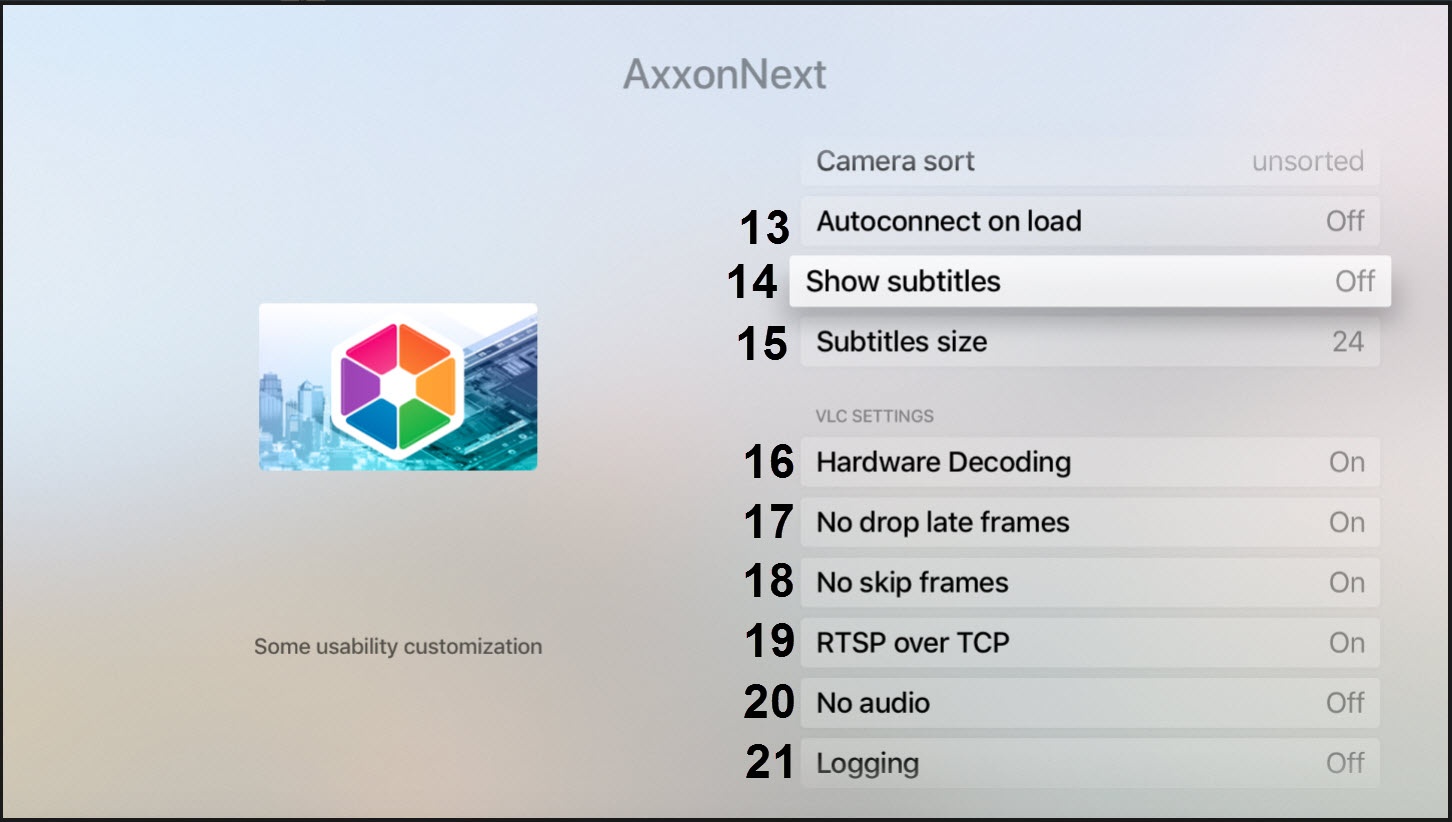
- By default, subtitles are enabled in Apple TV Client. To disable the subtitles displaying during the video playback, disable the Show subtitles option (14).
- In the Subtitle Size Subtitles size (15), select the subtitles size:
- 36;
- 24;
- 12.
- By default, the hardware video decoding is enabled in Apple TV Client. To disable it, disable the Hardware Decoding (16) option.
- By default, the delayed frames are not discarded (the No drop late frames option is enabled). To allow discarding the delayed frames, disable the No drop late frames option (17).
- By default, the frames are not skipped (the No skip frames option is enabled). To allow skipping the frames, disable the No skip frames option (18).
By default, the video streaming over TCP is enabled. To disable it, disable the RTSP over TCP option (19).
Info title Note When the RTSP over TCP option is disabled, the video is streamed via UDP.
Enable the No audio option (20) to play video without sound.
Info title Note Video playback with audio is enabled only on the Axxon Next Server and when the RTSP video playback mode is selected.
- Enable the Logging option (21) to log the Apple TV Client working process.
Overview
Content Tools