


Page History
...
Select the Mode (1) parameter to proceed to the sub-menu to select the playback format:
- MP4 - less resource-intensive than mjpeg and supports the H.264 and H.265 codecs.

Info title Note If the MP4 playback format is selected and the camera uses the H.265 stream, it is recommended not to disable the Hardware Decoding (see Configuring the VLC in the AxxonNet iOS mobile client).
- MJPEG - the frame-by-frame compression method. Its main feature is the compression of every separate video stream frame by means of the JPEG image compression algorithm.
- MP4 - less resource-intensive than mjpeg and supports the H.264 and H.265 codecs.
Select the Stream (2) parameter to proceed to the sub-menu to select the video stream quality:
- First - is the first camera stream.

- Light (lowest bitrate) - is the stream with the lowest bitrate.
- Best quality - is the stream with maximum quality (maximum bitrate).
- First - is the first camera stream.
- Select the Video Resolution (3) parameter to proceed to sub-menu to select the image resolution:
- Max - is the original image resolution.
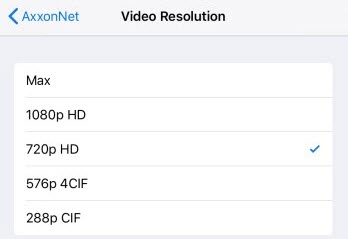
- 1080p HD.
- 720p HD.
- 576p 4CIF.
288p CIF.
- Max - is the original image resolution.
Select the Video Resolution Preview Resolution (4) parameter to proceed to the sub-menu to select the cameras preview resolution:
- Max - is the original image resolution.

- 576p 4CIF.
- 288p CIF.
- Max - is the original image resolution.
- Select the FPS (5) parameter to proceed to the sub-menu to select the maximum fps of the video playback.
- Max - is the original fps.

- 12 - 12 fps.
- 6 - 6 fps
3 - 3 fps.
Info title Note This configuration is applied only when connected to the Intellect Server.
- Max - is the original fps.
...
Overview
Content Tools