Versions Compared

Key

  • This line was added.
  • This line was removed.
  • Formatting was changed.

...

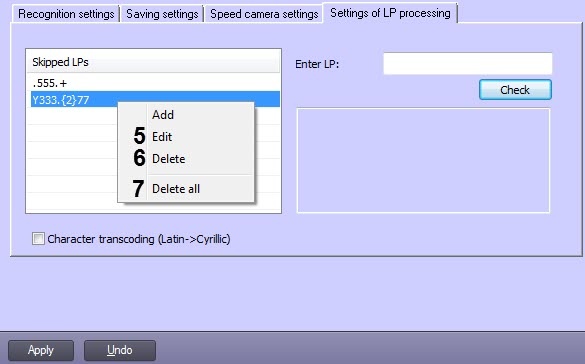
  1. On the LPR channel object settings panel, go to the Settings of LP processing tab (1).
    Image Modified
  2. To enable automatic transcoding of Latin characters into Cyrillic, set the Character transcoding (Latin->Cyrillic) checkbox.
  3. To configure the ignoring of numbers according to the list of rules, do the following:

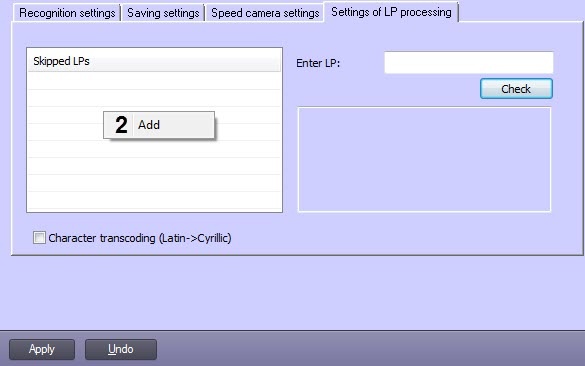
    1. Right-click on the Skipped LPs field, and then click the Add button (2).
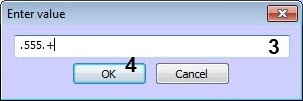
    2. Enter the required rule using regular expressions (3). A rule can contain either an exact number or a regular expression.

      Info
      titleNote

      For example, the regular expression ".555.+" means that there can be only one arbitrary character before "555", and many arbitrary characters after "555".


    3. Click OK (4).

    4. To edit or delete an already added rule, right-click on it and select the appropriate action by clicking Edit (5) or Delete (6). The Delete all button (7) is used to delete all rules.
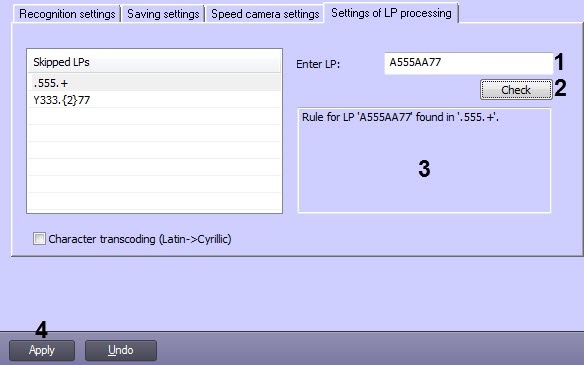
    5. You can check if the specified rule is correct. To do this, enter the test LP in the Enter LP field (1) and click Check (2). The result will appear below in the field (3).
  4. Click Apply (4). 

...