
Go to documentation repository


Page History
...
In this case, you must start Clients with the additional parameter -monitor=N, where N is the number of the monitor on which the Client is to be started.
| Note | ||
|---|---|---|
| ||
The maximum number of running Clients is limited to the number of connected monitors that support the minimum required resolution (see Limitations of the Axxon Next Software Package). You can run only one Client on a single monitor. |
To run multiple Clients:
- On your desktop, create a number of Client shortcuts equal to the number of connected monitors.
- In the properties of each shortcut, in the Target line, add the additional parameter -monitor=N.

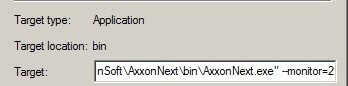
- Start the Clients by using the shortcuts.
...
Overview
Content Tools