
Go to documentation repository


Page History
Przed uruchomieniem systemu sprawdź gotowość do pracy całego środowiska komunikacyjnego, kamer, mikrofonów i innych komponentów systemu.
Aby rozpocząć pracę z oprogramowaniem, należy wykonać następujące czynności:
- Idź do Start → Wszystkie Programy → Axxon Next → Axxon Next.
Uruchomi się klient Axxon Next i pojawi się okno logowania.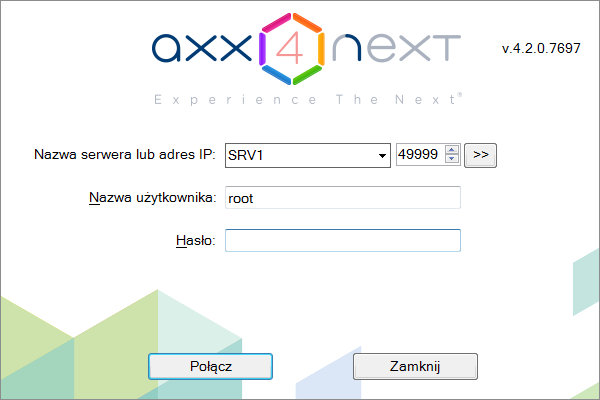
- Wpisz nazwę użytkownika i hasło oraz kliknij Połącz
Check readiness for operation of the entire communication environment, cameras, microphones and other system components before starting the system.
To start working with the software, you must perform the following steps:
...
- .
| Info | ||
|---|---|---|
| ||
When logging into the system for the first time, use the user name root, which has administrator permissions. Enter "root" into the User name and Password fields. The administrator then needs to configure the system for multi-user access. |
If authorization is successful, a video surveillance monitor will be displayed on the screen.
Before closing Axxon Next, you need to exit the user interfaces. To do this, you need to do one of the following:
- Click the
 button located under Settings.
 - In the Windows taskbar notification area, in the context menu of the Axxon Next icon, select Close window.
Podczas pierwszego logowania do systemu użyj nazwy użytkownika root, która ma uprawnienia administratora. Wprowadź "root" w polach Nazwa użytkownika i Hasło. Administrator musi następnie skonfigurować system pod kątem dostępu dla wielu użytkowników. |
Jeśli autoryzacja się powiedzie, na ekranie zostanie wyświetlony monitor systemu nadzoru wideo.
Przed zamknięciem Axxon Next, musisz wyjść z interfejsów użytkownika. Aby to zrobić, musisz wykonać jedną z następujących czynności:
- Kliknij przycisk
 umieszczony w sekcji Ustawienia.
 - W obszarze powiadomień paska zadań systemu Windows, w menu kontekstowym ikony Axxon Next, wybierz Zamknij okno.
Po wykonaniu jednej z tych czynności pojawi się okno autoryzacji. Aby zamknąć Axxon Next (całkowicie wyjść z klienta), kliknij Zamknij
...
.
Overview
Content Tools