
Go to documentation repository


Page History
Aby stworzyć lokalne archiwum:
W gałęzi obiektu typu In the branch of the Server object corresponding to the computer on which you need to organize an archive, click the Create link Serwer, na którym chcesz utworzyć archiwum, naciśnij przycisk link Utwórz.

Info title Note You can also create an archive by selecting the matching command in the context menu of the Server object (the menu can be brought up by right-clicking the name of the Server)
Możesz utworzyć archiwum także poprzez wybór odpowiedniej komendy w menu kontekstowym obiektu typu Serwer (menu może zostać wyświetlone poprzez naciśnięcie prawym przyciskiem myszy na nazwę Serwera).
- Naciśnij wyświetlony link Nowe archiwum Highlight the New archive link which appears (1).

- Set the archive type to Local.
- Specify the name and color of the archive.

- Ustaw typ archiwum na Lokalne (2)
- Wpisz nazwę oraz kolor identyfikacyjny archiwum (3).
Skonfiguruj woluminy archiwum.
- Zaznacz odpowiednie pola wyboru przy dyskach, które mają zostać elementami archiwum.
Jeśli dysk nie posiada systemu plików, może zostać utworzony wolumin archiwum w formie partycji. W tym przypadku, wybierz opcję Format. Spowoduje to sformatowanie dysku przy pomocy systemu plików SolidStore rozwijanym przez AxxonSoft (zobacz:
Configure archive volumes.
- For the disks that you want to include in the archive, select the corresponding check boxes.
If a disk does not have a file system, the disk can contain an archive volume in the form of a partition. In this case, select the Formatting check box. This will format the disk using the SolidStore file system developed by AxxonSoft (see Ogólne informacje o systemie plików Solid Store).


Info title Note System plików na dysku może zostać skasowany poprzez standardowe narzędzie Zarządzania dyskami w Windows. Szczegółowe instrukcje na temat uruchamiania oraz używania narzędzia są podane na stronie internetowej Microsoft.
Usuwanie systemu plików z dysku w narzędziu Zarządzania dyskami składa się z następujących kroków:
- Usunięcie woluminu.
- Stworzenie nowego woluminu w powstałej niesformatowanej części dysku.
- Wpisanie litery dysku dla woluminu bez formatowania go.
Dysk systemowy nie może być kompletnie zalokowany na potrzeby archiwum.
The file system on the disk can be erased by using the standard Disk Management utility in Windows.Instructions for starting and using the utility are given on the Microsoft website.
Deleting the file system on the disk in the disk management utility consists of the following:
- Delete the volume.
- Create a new volume in the resulting unformatted area.
- Assign a letter to the volume, but do not format it.
The system disk cannot be completely allocated for an archive
Note title Important! When selecting the disk on which to place the archive volume, take its size into account. If the archive is completely filled, the oldest data will be overwritten with new dataPodczas wybierania dysku, na którym masz zamiar umieścić wolumin archiwum, weź pod uwagę jego rozmiar. Jeśli archiwum zostanie całkowicie wypełnione danymi, najnowsze dane będą zapisywane w miejscu najstarszych.
Info title Note Note that you cannot create an archive volume as a partition on a removable disk, since its partition cannot be erased through the Disk Management utility
Nie można utworzyć woluminu archiwum na partycji dysku przenośnego, gdyż partycje dysków przenośnych nie mogą być usuwane poprzez narzędzie Zarządzania dyskami.
Na dyskach, które posiadają system plików, możesz utworzyć wolumin archiwum w formie pliku.
Dla tego typu woluminu archiwum, należy podać rozmiar pliku (w gigabajtach), lub ustawić rozmiar, korzystając z suwaka. Wielkość archiwum musi być większa niż 1 GB. Jeśli system plików to Fat32, maksymalny rozmiar archiwum wynosi 4 GB.
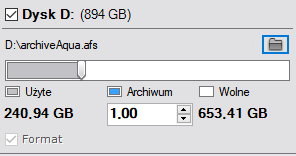
On disks that have a file system, you can store an archive volume in the form of a file.
For this archive volume, you must enter a file size (in gigabytes) or set it by moving the slider. The size of the archive file must be more than 1 GB. For the Fat32 file system, the maximum archive size is 4 GB.

Note title Important! If the archive is completely filled, the oldest data will be overwritten with new dataJeśli archiwum zostanie całkowicie wypełnione, najstarsze dane będą nadpisywane przez najnowsze.
Info title Note By default, the file name will be the same as the name of the archive, and the file will be located at the root directory of the disk. To change the name and/or location of the file, click the
 button.
- Click the Apply button.
If volumes are configured in the form of partitions, a dialog box is displayed, warning about formatting of the relevant system disks.
- Read through the list of partitions that will be formatted. If the list is correct, select I have read the warning and realize the risk of losing important data, then click Format. Otherwise, click Cancel to return to the archive settings.
Domyślnie, nazwa pliku będzie taka sama, co nazwa archiwum, a plik będzie znajdować się w głównym katalogu dysku twardego, Aby zmienić nazwę lub lokalizację archiwum, naciśnij
.
- Naciśnij przycisk Zastosuj.
Jeśli woluminy są tworzone w formie partycji, wyświetli się okno dialogowe, informujące o potrzebie sformatowania odpowiednich dysków systemowych.
- Sprawdź listę partycji, które zostaną sformatowane. Jeśli lista jest poprawna, zaznacz Przeczytałem ostrzeżenie i zdaję sobie sprawę z ryzyka utracenia ważnych danych, a następnie naciśnij Format. W innym przypadku, naciśnij Anuluj i wróć do ustawień archiwum.
Tworzenie lokalnego archiwum jest zakończoneCreation of the local archive is now complete.
Overview
Content Tools