
Go to documentation repository


Page History
...
- In the list of archives on the Axxon-domain, select the archive to which you want to copy data from other archives.
Select one or more archives form which you want to copy data (1). You can also replicate video from on-board camera storage (4, see The Embedded Storage storage object)
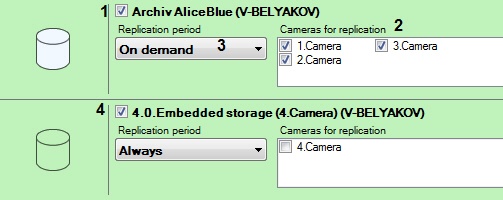
For each archive, select the cameras from which data will be copied to the source archive (2). To select all cameras, click the Select All button.
Info title Note Data for a particular camera can be copied to the source replication archive only from one archive. When you select a camera for replication from an archive, the camera becomes unavailable for replication from any other archive.
Info title Note You cannot select cameras if they are already being recorded recording to the source replication archive.
Select replication period (3):
Always - replication is performed continuously.
On demand - replication is performed manually.
Note title Attention! You can use macros to replicate on schedule (see Start replication).
- Click the Apply button.
...
Overview
Content Tools