
Go to documentation repository


Page History
Akcja ta otwiera układ oraz mapę dla układu z zaznaczoną pozycją kamery.
Aby skonfigurować to polecenie, wykonaj następujące kroki:
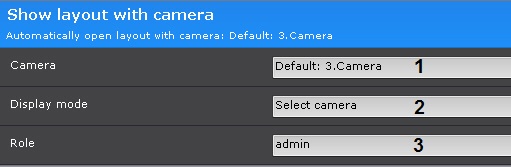
Wyznacz kamerę (1). Możliwe jest wyznaczenie dowolnej kamery - Kamera, która zainicjowała wywołanie komendy.
Dla opcji Przełącz do trybu archiwum (patrz: krok 2.) istnieje możliwość wyznaczenia grupy kamer
This opens the relevant layout and map with the camera marked on it.
To configure the command, do as follows:
Select a camera (1). An implicit selection of a video camera is also allowed - Camera that initiated command execution.
For the Go to archive mode (see step 2), you can select a group of cameras.
Info title Note In this software version, you cannot select a group of cameras for this action.
W obecnej wersji oprogramowania wybranie grupy kamer może nie być możliwe.
Wyznacz Tryb wyświetlania Select the display mode (2).
Display mode
DescriptionTryb wyświetlania
Opis
Select camera The camera tile is highlighted on the layout Zoom in camera The camera tile is highlighted on the layout, the viewing tiles take up 98% of the screen Zoom in and show map The camera tile is highlighted on the layout, the viewing tiles take up 50% of the screen, the map under the tiles shows the camera.
Switch to immersion mode Immersive mode, the viewing tiles take up 50% of the screen Switch to Archive Mode
The camera window is highlighted on the layout and it is in archive mode. If a group of cameras is specified, then a layout is created with all the cameras in archive mode.
Select the user roles, this command applies to (3)
This command uses the following algorithm:
Wybierz kamerę Podgląd kamery jest zaznaczony w układzie Przybliżenie w kamerze Podgląd kamery jest zaznaczony w układzie; okno podglądu zajmuje 98% ekranu Przybliż i pokaż mapę Podgląd kamery jest zaznaczony w układzie, okno podglądu zajmuje 50% ekranu; mapa pod podglądem kamery wskazuje pozycję kamery
Przełącz do trybu zanurzenia Tryb zanurzenia, okno podglądu kamery zajmuje 50% ekranu Przełącz do trybu archiwum
Podgląd kamery jest zaznaczony w układzie; jest on w trybie archiwum. Jeśli wyznaczona jest grupa kamer, tworzony jest układ ze wszystkimi kamerami w grupie, z których wszystkie są wyświetlane w trybie archiwum.
Wyznacz uprawnienia użytkownika (3).
Komenda ta korzysta z następującego algorytmu:
- System szuka układów, które zawierają wybraną kamerę wideo, i są dostępne dla użytkownika.
- System wybiera układ o najmniejszej ilości komórek w celu wyświetlenia wybranej kamery wideo.
- Jeśli taki układ nie istnieje, system tworzy nowy układ z wybraną kamerą wideo.
- System przełącza widok do stworzonego/wybranego układu.
Wyznaczony proces jest uruchamiany
- The system searches for layouts that contain the specified video camera and are accessible to the user.
- The system chooses the layout with the minimum number of cells to display the selected video camera.
- If the required layout does not yet exist, the system creates a new layout with a single video camera.
- The system switches to the selected layout.
The specified process is running.
Overview
Content Tools