
Go to documentation repository


Page History
...
№ | Parameter | Method for setting the parameter value | Description | Presented as | Default value | Range of values | |||
| 1 | The DTMF type drop-down list | Is selected in the list | Sets the type of the tone DTMF command | Supported signal type | sip_info | sip_info – signals are transmitted in the SIP INFO message. sip_notify – signals are transmitted in the SIP NOTIFY message. in_band – the signal is transmitted as normal sound in an audio stream. http_bas – signals are transmitted over the HTTP protocol separately from the voice stream. | |||
| 2 | The Signal duration, ms field | Enter the value in the field | Sets the time period in milliseconds during which the command is to be sent. | Integer | >0 | ||||
| 3 | The Device connection settings | groupbutton | - | Opens a pop-up window of connection settings when the http_bas type of tone is selected | - | Inactive by default | - | ||
| 4 | The Name | 3 | The Login field | Enter the value in the field | Sets the user name to connect to the (BasIP) SIP devicename of the command displayed on the SIP panel | Latin, Cyrillic letters and service characters | -A line representing a sequence of any symbols (letters, numbers, service symbols) | ||
| 5 | The Code field | Enter the value in the field | Sets the unique command code | Integer or HTTP request (for http_bas) | A line containing a natural number or HTTP request |
The Device connection settings pop-up window
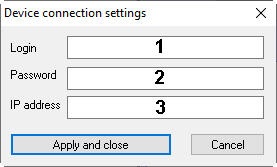
Table describes the parameters of the Device connection settings window.
№ | Parameter | Method for setting the parameter value | Description |
Presented as | Default value | Range of values | |
| 1 | The Login field | Enter the value in the field | Sets the |
| user name to connect to the (BasIP) SIP device | Latin, Cyrillic letters and service characters | - | A line representing a sequence of any symbols (letters, numbers, service symbols) |
| 2 | The |
| Password field | Enter the value in the field | Sets the password to connect to the (BasIP) SIP device |
| Latin, Cyrillic letters and service characters | - | A line representing a sequence of any symbols (letters, numbers, service symbols) |
| 3 | The |
| IP address field | Enter the value in the field | Sets the |
| (BasIP) SIP device IP address | IP address | - | 1.0.0.0 - 255.255.255.255 |
Overview
Content Tools