
Go to documentation repository


Page History
...
The events log window interface is shown in the figure.

All displayed events are listed in the event table depending on the selected filters.
...
The icon opposite the event source shows the extra info on the event. For example, for the Camera event source object the following icons are used in the Event viewer:
 icon is displayed for the Record on disk stopped, Alarm end, Harddisk rec and Record off events.
 icon is displayed for the Alarm and Armed events.
 icon is displayed for the Disarmed event.
For every event in the table there is provided a functional context menu,called by clicking the right mouse button upon the line with the name of the coresponding event in the table. The particular content of the functions menu depends on the event source object type. For example, the Camera type event source object functions menu is shown in the figure.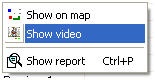
The Clear button is used to clear the list of events in the Event viewer.
| Info | ||
|---|---|---|
| ||
After the Event viewer is cleared and if hidden events are to be displayed again, then Intellect Axxon PSIM is to be restarted with the Load protocol checkbox set checked (see Event viewer parameters section in Administrator's Guide). |
Overview
Content Tools