
Go to documentation repository


Page History
...
Two versions of Axis T8310 control panel are integrated with Intellect Axxon PSIM: Rev01 and Rev02. The setup and operation procedure for these versions in Intellect Axxon PSIM is similar.
It is not recommended to connect control panels of both versions to Intellect Axxon PSIM at the same time to avoid incorrect operation of the system.
The control panel can be added to Intellect Axxon PSIM as a control device – see Configuring the Control device object. In this case, events on pressing keys, changing the position of the joystick, etc. in the Event Viewer are received from the Control Device object.
Configuring Axis T8310 control panel in IntellectAxxon PSIM
Configure Axis T8310 control panel in Intellect Axxon PSIM as follows:
- Create the Telemetry controller object.
- Configure the Telemetry controller object as follows:
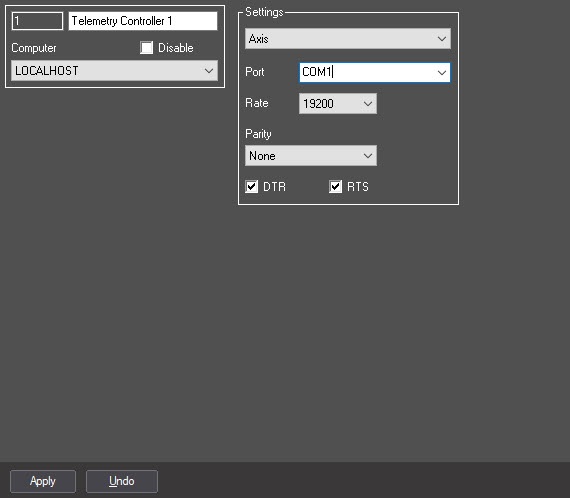
Set the Axis interface protocol.
- Other settings of this object are ignored by system because the control panel of Axis T8310 telemetry is connected to the Server using USB interface.
Create the Control panel system object under the Telemetry controller object.
Configure the Control panel object as described in Configuring Control panel section.
- If Rev01 panel is in use, restart IntellectAxxon PSIM
Axis T8310 control panel is now configured in IntellectAxxon PSIM.
Features of Axis T8310 control panel operation in
...
Axxon PSIM
| Info | ||
|---|---|---|
| ||
Detailed information on Axis T8310 control panel is given in official reference documentation on this device |
Pressing the key on Axis T8310 control panel there is Key is pressed or Key is released message in Intellect Axxon PSIM.
AXIS T8310 control panel is a modular system that consists of three devices:
...
- scripts in JScript (see details on how to create scripts in Programming Guide (JScript));
- programs in internal language in INTELLECTAxxon PSIM;
- macros (see Creating and using macros).
Pressing the key on the keyboard of AXIS T8310 control panel in Intellect Axxon PSIM there is Key is pressed or Key is released message.
...
When the position of AXIS T8313 joystick is changed, the Intellect Axxon PSIM receives the Position is changed message.
...
Overview
Content Tools