
Go to documentation repository


Page History
...
- Run dbi.exe (see The ddi.exe utility for editing database templates and external settings files).
- Go to the DBI tab.
Create two objects – OBJ_CUSTOM and OBJ_CUSTOM_CHILD – as shown in the figure below.
Note title Important! Object (table) names should look like OBJ_<object type>. 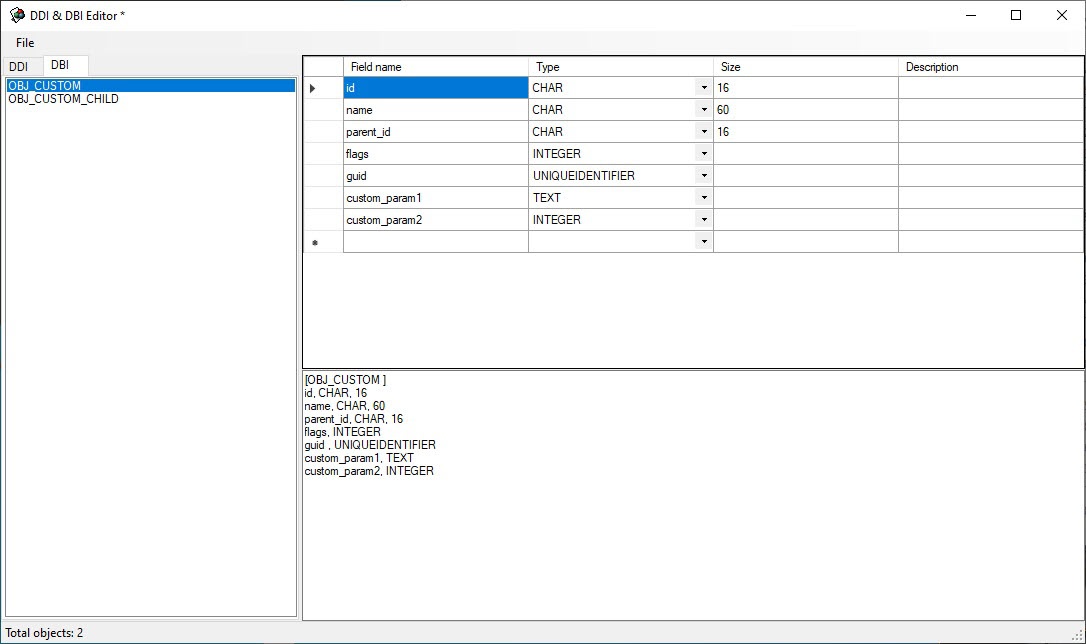
Info title Note. Id, name, parent_id, flags and guid parameters are mandatory for all objects. Custom_param1 and custom_param2 are user parameters. - Save changes using the Save command in the File menu. The saved file must have dbi extension and must be located in Intellect Axxon PSIM installation directory - C:\Program Files (x86)\IntellectAxxon PSIM\intellectAxxon PSIM.custom.dbi
dbi file preparation is complete.
Overview
Content Tools