
Go to documentation repository


Page History
...
- Select Save in the File menu.

Select the removable disk where the query file is to be saved in the drop-down list of the opened dialog box (1).
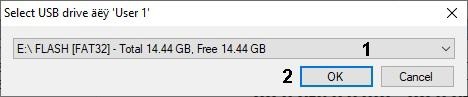
Info title Note. The Removable disks are not found message will be displayed if the removable storage is not found while saving the query file. Info title Note. If there is the IntellectBackup Axxon PSIMBackup folder on the removable storage, then the dialog box asking to delete this folder is displayed. Click the OK button . 
- Click the OK button (2). The query file is saved on the selected disk.
...
Overview
Content Tools