
Go to documentation repository


Page History
One or several controllers can be connected to the Suprema 2 controller. As a result, the Master-Slave mode is created, where the slave controller acts as a reader, and the Master controller makes the decision to grant access (for details, see the official reference documentation for the system by the manufacturer Suprema Inc.).
The Suprema 2 slave controller is configured as follows:
- Go to the Suprema 2 Slave object settings panel. The object is created based on the basis of the Suprema 2 Host object.
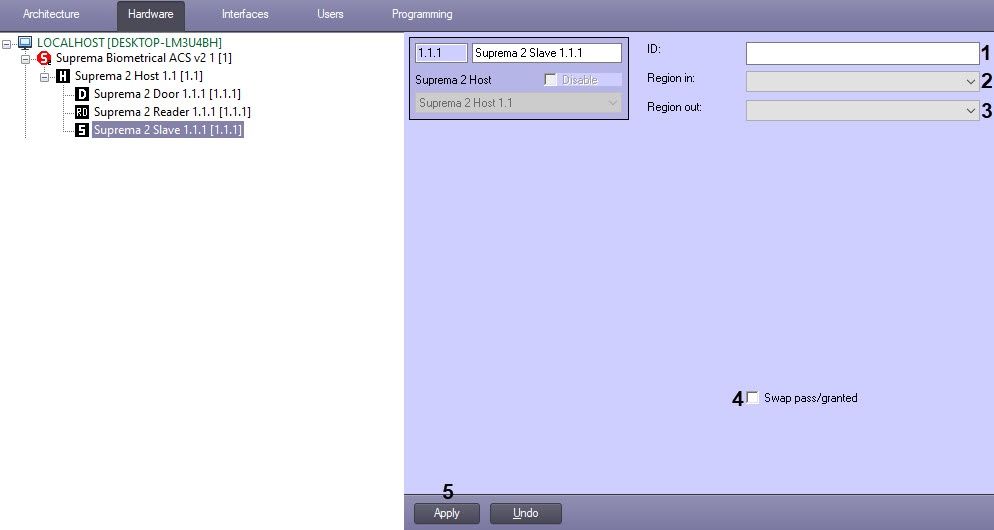
- In the ID (1) field, specify the identification number of the controller.
- From the Region in (2) drop-down list, select the Region corresponding to the area located at side of exit through the controller.
From the Region out (3) drop-down list, select the Region corresponding to the area located at side of entrance through the controller.
Info title Note. The Region in and Region out are to be selected if Time&Attendance interface module is in use. Otherwise, leave these fields empty.
- Click the Apply (4)button to save changes (4).
Configuring the Suprema 2slave controller is completed.
Overview
Content Tools