
Go to documentation repository
...
In the setup.ini file, located in the directory with the POS PSIM distribution kit, specify the following:
| Code Block |
|---|
CmdLine= /quiet |
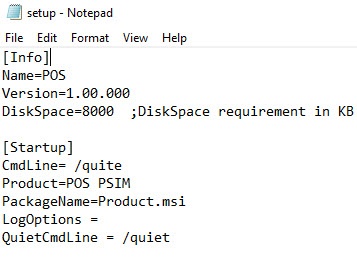
When you run the Setupsetup.exe file, the POS PSIM installation in silent mode will begin.
Go to the directory with the POS PSIM distribution kit, and enter the following command at the Windows command prompt:
| Code Block |
|---|
setup.exe /quiet |
Immediately after running this command, the POS PSIM installation in silent mode will begin.

