
Go to documentation repository


Page History
...
- Set the control device address: Select System - Network in the device internal menu, then disable DHCP and set IP address and gateway.

Set the Axxon PSIM server IP address and port on the device: Open the device web interface by entering the above set IP address in the web browser, then select Platform Access - Third-Party Platform.
Info title Note. The web interface is only available on https by default, so please use https prefix before the IP address.

- Set the 8. Private VMS mode in the device's internal interface.

- Transfer the PTZ control device to operating mode by one of the following actions:
- Select any monitor MON (monitor) [integer in the range 1-9999], any camera CAM (camera) [integer in the range 0-999999]; in this mode all keys will work, including the WIN (subwindow of video wall) and MULT (layout size) keys for the monitor and camera.
- Select any camera CAM (camera) [integer number in the range 1-999999 (number 0 is available only when setting the monitor)]; the WIN, MULT and CAM-G keys will not work in this mode.
Select any monitor MON (monitor) [integer in the range 1-9999] and any group of cameras CAM-G (camera group) [integer in the range 1-999999]; in this mode, only the MULT, OK keys and the rotations of the joystick axes will work.
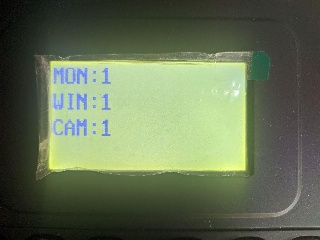
Info title Note. To select these parameters, enter a number on the device keypad, then press the corresponding key (MON / WIN / CAM / CAM-G).
If the the the server IP address and/or port is not accessible from the PTZ control device, the the "Connect failed" message will be displayed on the control device screen after pressing the MON / WIN / CAM / CAM-G keys.
...
- Create the Control device object under the Computer object on the Hardware tab of the System settings dialog window (1).
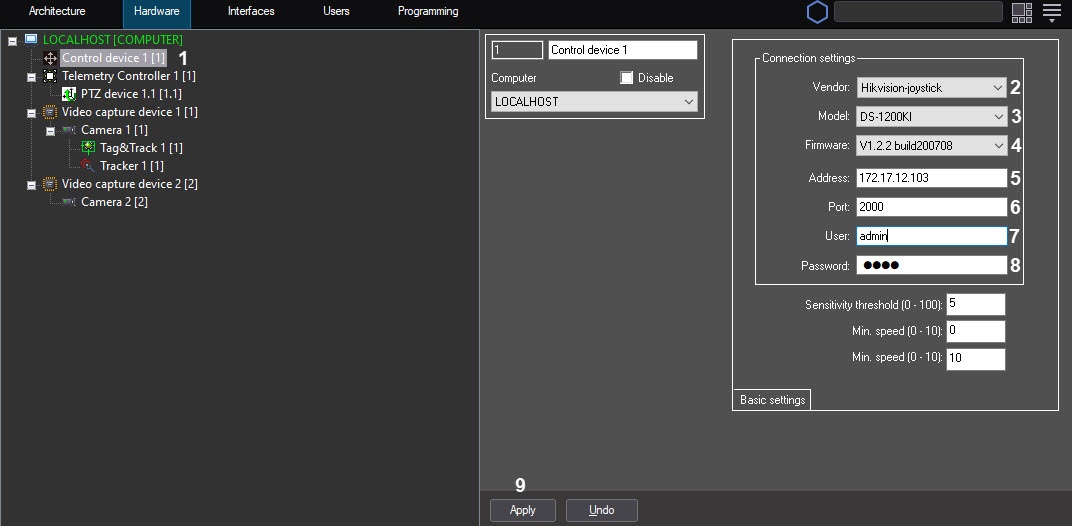
- Select Hikvision-joystick from the Vendor dropdown list (2).
- Select DS-1200KI from the Model drop-down list (3).
- Select V1.2.2 build20051 from the Firmware drop-down list (4).
- In the Address field, enter the IP address of the control device (5).
- In the Port field, enter the port of the control device (6).
- In the User field, enter the username to access the device (7).
- In the Password field, enter the password to access the device (8).
- Click the Apply button (9).
...
Overview
Content Tools