
Go to documentation repository


Page History
...
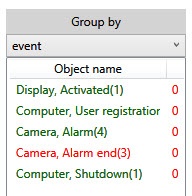
- Green, if events in group are pending, taken into processing, escalated or suspended by the current Operator.
- Red, if the events in group are taken into processing or suspended by another Operator, and also if the processing of events in group is completed by any Operator.
- Black, if there are no Operators in the system (not a single User is registered in Axxon PSIM).
| Info | ||
|---|---|---|
| ||
Specific cases of color highlighting of group names:
|
To sort the groups alphabetically, click on the Object name field:
...
Overview
Content Tools