
Go to documentation repository


Page History
...
| Section | |||||||||||||||||||||
|---|---|---|---|---|---|---|---|---|---|---|---|---|---|---|---|---|---|---|---|---|---|
|
Video Video capture card resources
By default the resources of video capture cards are uniformly distributed between cameras video signals of which are digitized and processed by this ADC. The frame rate of the digitized video signal is limited by the ADC resources for video signal processing and digitization.
Video capture cards may be configured, so as to give to one or more cameras additional ADC resources, and thus to increase the frame rate of video signals from these cameras. At the same time the frame rate of video signals from other cameras is decreased.
Axxon PSIM™ software PSIM and video capture cards sharing allows reallocating video capture card resources to the cameras:
...
In the Live video mode all resources of an ADC are used to process the single video signal. The mode provides digital video stream with a maximum frame rate of 25 fps FPS in PAL format and 30 fps FPS in NTSC format.
If the ADC processes two or more video signals, its resources are used in the multiplexing mode. Then the ADC resources are uniformly allocated between the cameras, and part of its resources support the multiplexing process. So, in the multiplex mode the total frame rate of video signals, digitized by a single ADC, is much lower than in the Live video mode.
...
For ADC that digitizes all video signals with standard (352 x 288 pixels in PAL format, 352 x 240 pixels in NTSC format) and/or high (704 x 288 pixels in PAL format, 640 x 240 pixels in NTSC format) frame resolution, the total frame rate is 16 fps FPS in PAL format and 20 fps FPS in NTSC format.
When ADC digitizes at least one of the video signals with full resolution (704 x 576 pixels in PAL format, 640 x 480 pixels in NTSC format), the maximum permissible total frame rate is reduced to 12 fps FPS in PAL format and 15 fps FPS in NTSC format.
Frame rate setup procedure
Default settings for the digitized video signals frame rate are 2 fps FPS in PAL format and 2.5 fps FPS in NTSC format.
While settings it is possible to increase or to reduce the frame rate.
...
To prevent allocation of ADC resources, the Camera objects are to be disabled in Axxon PSIM™PSIM, assigned to the disabled video channels.
To disable the Camera objects in Axxon PSIM™ systemPSIM, do the following:
- Define the numbers of the idle video capture channels (taking into account BNC plug numbering).
- Go to the Hardware tab in the System settings dialog box (1).
- Select the Camera object, created before, with the same channel number as the BNC plug (idle channel) (2). The settings panel for the selected object is displayed on the right of the Hardware tab.

- Make sure that no signal is displayed in the video field (1).

- The signal displayed in the video field indicates that the Camera object is matched to another video channel.The video channel number is specified in the Channel number drop-down list in the Basic settings tab (2). Match the Camera object with the channel number, which corresponds to the BNC plug number and the Camera object number, or scan for a Camera object, matched with the desired channel number.
- Set the Disabled checkbox (3).
- Click the Apply button (4).
...
- Configure the video surveillance monitor (see Configuring video display on Video Surveillance Monitor section);
- Enable the debug mode in Axxon PSIM™ software PSIM using the tweaki.exe utility (see Tweaki.exe utility for advanced setup of the Axxon PSIM software system section).
In Axxon PSIM™ software, PSIM actual frame rates of digitized video signals in the debug mode are displayed on the Monitor. To define the frame rate of video signal from a selected camera, do the following:
- Display the selected camera box on the Monitor.
- Activate the selected camera box by left clicking on it.
- The actual frame rate of the selected window video signal is displayed in the information window in the top right corner of the Monitor.

| Info | ||
|---|---|---|
| ||
| For Stretch video cards of standard compression (h264) the frame rate that is displayed on Monitor in Axxon PSIM™ software PSIM can be less than the frame rate that is indicated by the video card manufacturer. This is due to the fact that while displaying the frame rate of video signal digitization on Monitor in Axxon PSIM™ software PSIM blank frames that are distributed by the video card, are not taken into account. «Blanck frames» do not contain the information about the image and are created by the video capture card when there are no changes in the video stream and a new video frame is the same as the previous one (for example, there is no motion in the frame). |
Changing Changing frame grooming
By default Axxon PSIM™ software PSIM digitizes video signals with the frame rate lower than maximum allowed one. This is caused by the following:
...
To change grooming of ADC video signals, do the following:
- Go to the Hardware tab in the System settings dialog box (1).
- Select the relevant Video Capture Device object, created before, in the Hardware tab in the objects tree (2). The settings panel for the selected object is displayed in the right part of the Hardware tab.

- If it is necessary to increase the total frame rate up to the maximum allowed value, move the Rate slider to the Max position (3).
- If it is necessary to reduce the total frame rate to the minimum allowed value, move the Rate slider to the Min position. The minimum total frame rate of video signals, digitized and processed by selected ADC, is 3 times lower than the maximum allowed one.
- If it is necessary to return the default grooming settings, move the Rate slider to the middle position. The default total frame rate is 2 times lower than the maximum allowed one.
- Click the Apply button (4).
- Close the System settings dialog box and restart Axxon PSIM™ softwarePSIM.
| Info | ||
|---|---|---|
| ||
| Without restart, changes in video signal grooming may be applied incorrectly. |
...
Before reassigning the cameras to ADCs of the video capture card, disable the Camera objects corresponding to disabled cameras (see Configuring video subsystem with disabled video channels section).
| Info | ||
|---|---|---|
| ||
| Video Video inputs numeration of SC300Q16 (FX4) and SC300D16 (FX8) video capture cards does not correspond to the numeration of PCI channels in Axxon PSIM. It is impossible to allocate video inputs to chips one after another (i.e. the first corresponds to 1 and 2 chips, the second upper input corresponds to 3 and 4 etc.) because OS determines it. |
...
- Go to the Hardware tab in the System settings dialog box (1).
- Select the Camera object, created before, corresponding to the camera, which frame rate is to be increased, in the objects tree in the Hardware tab (2). The settings panel for the selected object is displayed on the right of the Hardware tab.
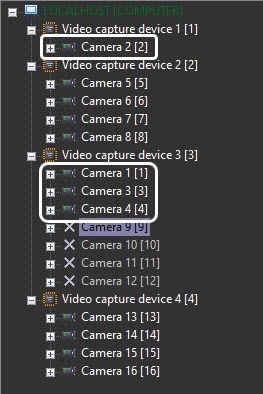
- To increase the frame rate of a camera up to the Real time rate (25 fps FPS in PAL format and 30 fps FPS in NTSC format), reallocate other cameras serviced by the same ADC as with the camera above, to other ADCs.
...
- Select the Camera 1 object in the objects tree. The settings panel for the selected object is displayed.
- Select Video Capture Device 3 in the Video Capture Device list.
- Click the Apply button.
- The Camera 1 object moves to the subdirectory of the Video Capture Device 3 object (see B).
- Repeat 1-4 steps for the Camera 3 and Camera 4 objects.
- Select the Video Capture Device 1 object in the objects tree.
- Make sure that the Speed slider is in the max position.
If the Speed slider is in the max position, then setup is completed.
If the Speed slider is in another position, move it to the max position and do 8-10 steps. - Click the Apply button.
- Close the System settings dialog box and restart Axxon PSIM™ softwarePSIM.
- The frame rate of the selected camera increases up to the Real time rate (for information on testing the frame rate change, see the Actual frame rate section).
- If the number of connected cameras prevents the configuration of video signal digitization from one of the cameras with the Real time rate (for example, when 15 of 16 allowed cameras are connected), or if the frame rate on several cameras is to be increased simultaneously to the rate, lower than the Real time one, then the cameras, the frame rate of which is to be increased, are allocated between ADCs and they do not exceed the maximum allowable number. The frame rate is increased by as many times, as the number of cameras on ADC is reduced.
...
Video capture card’s resources are now allocated.
| Info | ||
|---|---|---|
| ||
| Ways of resources allocation (given in examples) are not used for SC200Q4 (FS15)\SC200Q4 LOW PROFILE (FS115)\SC300Q16 (FX4)\SC300D16 (FX8) video capture cards, because for these cards numbers of PCI channels (specified in settings of the Video Capture Device objects) are connected with physical inputs (BNC connectors). |
...
A camera is allocated with additional ADC resources via the priority process queue.
Axxon PSIM™ software PSIM provides 1/2 and 1/3 process queues.
...
Overview
Content Tools