
Go to documentation repository


Page History
...
- Indicator of the presence of the camera associated with the event
 .
. - Incident handler.
- Event status.
- Object type.
- Object ID.
- Object name.
- Action — description of the event.
- Time the event occurred.
- Priority.
- Computer — the name of the computer from which the event was received.
- Time (sec) — the number of seconds since the event occurred.
- Last comment — only the last comment entered while processing the event.
- All comments — all comments entered while processing the event.
...
- Click the
 button (1).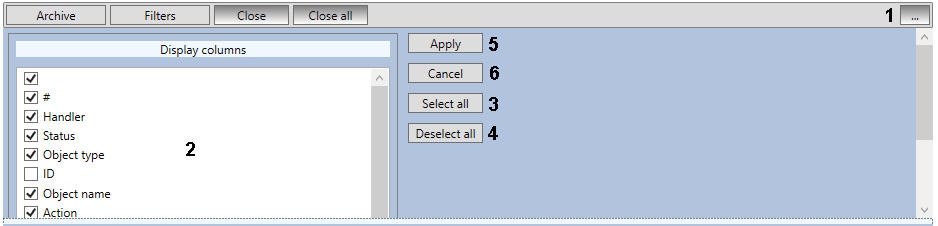
- Set the checkboxes next to the columns you want to display (2). To set checkboxes for all columns at once, click the Select all button (3), to uncheck clear the boxes, click the Deselect all button (4).
- Click the Apply button (5). To cancel the changes, click the Cancel button (6).
Event statuses
By default, an event in the Incident manager has an empty status. Eventually, an event may receive the following statuses:
...
Overview
Content Tools