
Go to documentation repository


Page History
| Note | ||
|---|---|---|
| ||
The PS-RTP Server object was excluded from Intellect since the version 4.11.3. |
The settings panel of the RSPS-RTP server Server object is shown in figures.

The General Main tab.

The Device list List of devices tab.
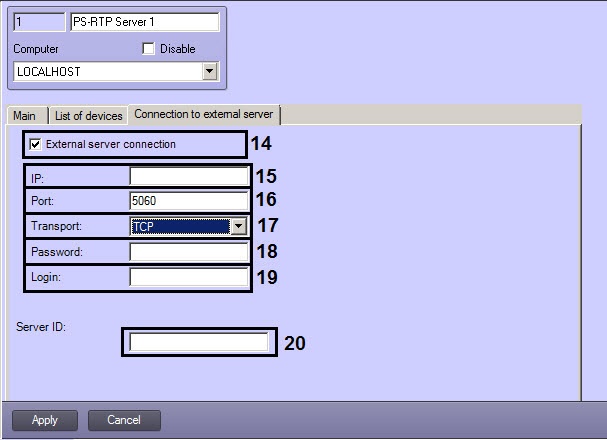
The Connection to external server tab.
The table describes the settings parameters of the settings corresponding to the elements of the settings panel of the RS PS-RTP Server system object.
# |
Name
Field type
Parameter name | Method of setting the parameter value | Parameter description | Format | Default value | Value range |
1 | ID | Automatically |
Displays the ID of the PS-RTP Server object in the system | Natural number series | - | Depends on the number of |
the PS-RTP Server objects in the system | |||
2 | Name | Enter the value in the field | Sets the name of |
the PS-RTP Server object | Latin, Cyrillic and service characters |
PS-RTP |
Server | A line containing a sequence of any symbols (letters, digits, service characters |
except for the > and < symbols), not case-sensitive Number of symbols – from 1 to 60 |
3 | Disable |
Set the checkbox | Sets the state of |
the PS-RTP Server object (disabled or enabled) | Boolean type | No |
Set – PS-RTP Server object is disabled and |
not in use |
Clear – PS-RTP Server object is enabled and |
in use |
4 | Computer | Select |
the value from the list | Sets the Computer parent |
object |
of the digital system with the distributed architecture to which the |
PS-RTP Server object is |
assigne | Names of the Computer objects registered in the system |
The name of the Computer parent |
object | Depends on the number of Computer objects in the digital surveillance system with the distributed architecture |
The | ||||||
Main tab | ||||||
5 | IP | |||||
Select |
the value from the list | Sets the IP address of the network interface using which the third-party software will control the registered in Intellect devices via the GB2818 protocol | IP address | Depends on the parameters of the network connection | Depends on the parameters and the number of the network connections |
6 | Port |
Enter the value in the field | Number of |
the port through which the third party software will be connected via the GB2818 protocol | Natural number series | 5060 | 0-65535 |
7 | Transport |
Select the value |
from the list |
Transport protocol for the data transfer |
Supported transport protocols | UDP | UDP, TCP | |
8 |
Automatically
ID of Intellect Server that is in use by the third-party software to connect to RS-RTP Server via the GB2818 protocol
-
-
-
9
from | Enter the value in the field | Lower |
limit of the RTP port range | Natural number series | - | 0-65535 |
9 |
to | Enter the value in the field | Upper limit of the RTP port range | Natural number series | - | 0-65535 |
| 10 | Server ID | Automatically | The ID of Intellect Server that is used by the third-party software to connect to the RS-RTP Server via the GB2818 protocol | - | - | - |
The List of devices tab | ||||||
11 | Type | Select the value | ||||
from the list |
The type of object to be controlled via the GB2818 protocol | Names of the types of objects in Intellect |
objects tree | - | Depends on the number |
of the objects created in Intellect |
objects tree |
12 | Name | Select the value |
from the list |
The name of the object to be controlled via the GB2818 protocol | Names of the objects in Intellect |
objects tree | - | Depends on the number |
of the objects created in Intellect |
objects tree | |||
13 | Device ID | Automatically | The ID of the device that will be |
used in the third-party software to control objects via the GB2818 protocol | - | - | - | |||
The Connection to | ||||||
external server tab | ||||||
14 | ||||||
External server connection |
Set the checkbox |
Defines if Intellect connects to |
the external supserver using the PS-RTP Server object via the GB2818 protocol | Boolean type | No |
Set – |
the external server connection is performed |
Clear – |
the external server connection is not performed |
15 | IP |
Enter the value in the field | IP address of the supserver | IP address | - | 000.000.000.000 – 255.255.255.255 | |
16 | Port |
Enter the value in the field | Port used to connect to |
the external server | Natural number series | 5060 | 0-65535 |
17 | Transport |
Select the value |
from the list | Transport protocol used to connect to |
the external server | Supported transport protocols | - | TCP, UPD |
18 | Login |
Enter the value in the field | Username used to connect to |
the external server | Latin, Cyrillic and service characters | - | A line containing a sequence of any symbols |
19 | Password |
Enter the value in the field | Password used to connect to |
the external server | Latin, Cyrillic and service characters | - | A line containing a sequence of any symbols |
20 | Server ID |
Enter the value in the field | The ID of the supserver via the GB28181 protocol | Natural number series | - | 00000000000000000000 - 99999999999999999999 |
Overview
Content Tools