
Go to documentation repository


Page History
| Section | |||||||||||||||||||||
|---|---|---|---|---|---|---|---|---|---|---|---|---|---|---|---|---|---|---|---|---|---|
|
...
- Select the object the size of which is to be edited. Green-pointed frame will appear around the image as a result.
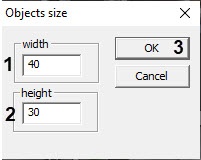
- Call for the Object’s size dialog window of the Edit map utility by the main menu command Operations with objects > Object’s size.
Specify the size of the image: Width (icon's width) and Height (icon’s height) fields – 1, 2. Icon’s size is expressed in pixels.
Info title Note If If 0 value is entered in the fields Width and Height , object’s icon will be displayed in the original size. Click Ok to save the changes (3).
...
- Select the object for which it is necessary to display the viewing angle. As a result, the object name will be highlighted with a border of green dots.
- Open the Properties panel for the required object (see Editing object properties using the Properties panel) and expand the PTZ settings group.

- Set the required field values:
- Angle on map — the direction of the display vector on the map. A value of 0 is the actual position of the camera at the time of setting the parameters.
- Telemetry deflection from zero — the actual offset of the camera.
- Viewing angle — the angle of the view display vector.
- Viewing distance — the size of the the view display vector.
- Color — the color of the view display vector.
- Nontransparency — the transparency of the view display vector.
- Invert pan — select True in the drop-down list if it is necessary to invert the camera rotation.
...
Overview
Content Tools