
Go to documentation repository


Page History
By the date the documentation in created, the Axxon Next software package includes integrated analytics for multiple video cameras (see Drivers Pack release notes).
If Axxon Next supports built-in analytics for a device, then detectors can be created (see Creating Detection Toolsdetection tools).
| Info | ||
|---|---|---|
| ||
Some devices may have issues with interdependent embedded analytics. If there is already a relevant detection tool in Axxon Next, you can add another one, but it will not work. |
Embedded Temperature Detection Tool
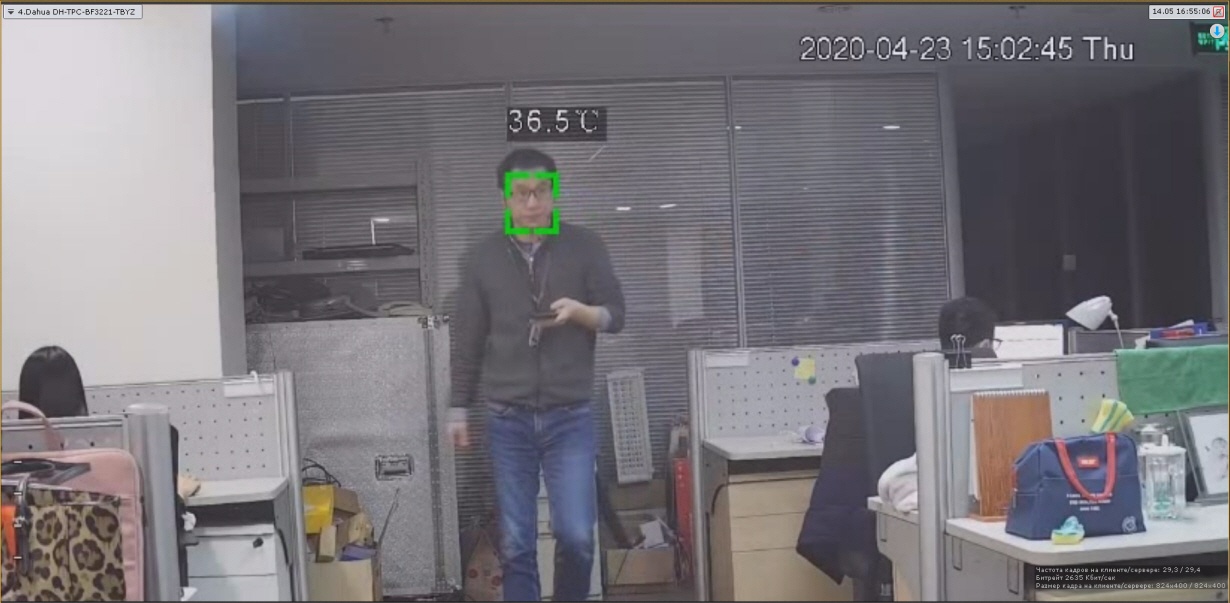
Axxon Next supports selected models of thermal cameras with an embedded temperature detection tool (the the Drivers Pack documentation, body temperature detection). This detection tool recognizes human faces on video, and performs temperature measurement on them.
...
- Create a detection tool (see Creating Detection Toolsdetection tools).
Using the camera manufacturer's documentation, set up the detection tool in the Axxon Next VMS.
Note title Attention! As a rule, a camera requires specifying the temperature threshold, upon reaching which the detection tool would trigger an alarm.
If required, set up macros to perform pre-defined actions upon triggering the detector (see Configuring Macros and Counters).
Some cameras are capable to display a bounding box over the facial image along with corresponding temperature readings. If this option is available, it can be activated via the web interface of a particular camera.
Obtaining metadata
...
The VMS can process ANPR data from some cameras ' on-board analytics.
| Info | ||
|---|---|---|
| ||
Please contact technical support https://support.axxonsoft.com/ for a support for a list of cameras with this feature. |
Generally, when configuring the embedded analytics you must follow official documentation for the corresponding video camera or parameter description in the Axxon Next interface.
Motion Mask
If the camera supports Motion Mask, then when you configure VMD, it will be displayed in the preview window.

If there is motion, but it does not exceed the threshold value (because of the detection sensitivity), the mask cells are colored green. If motion triggers VMD, the cells turn red.
Overview
Content Tools