


Page History
...
| Info | ||
|---|---|---|
| ||
For widget operation, you have to set up line crossing detection tools at least on two cameras: on entry and exit from the target area (see Settings Specific to Cross Line Detection). |
| Info | ||
|---|---|---|
| ||
The widget counts line crossing events within the last 24 hours. If a visitor enters the area and does not exit after 24 hours, their entry is ignored. |
...
- Enter a text message which indicates the number of visitors below the set threshold (1).

- Enter a text message which indicates the number of visitors exceeding the set threshold (2).
- Set the threshold value for the number of visitors (3).
Select one or several cameras on entry to the target area (4).

Info title Note You can select only cameras that have previously transmitted at least one event to AxxonNet.
- Select one or several cameras on exit from the target area (5).
To save settings, click the Apply button.
Info title Note To revert changes, click the Cancel button; to delete a widget, click Remove.
The widget indicates non-critical visitor count in green.

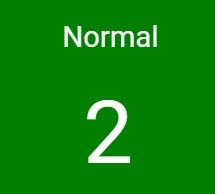
On exceeding the threshold value, the widget becomes red.


Overview
Content Tools