
Go to documentation repository


Page History
...
Press Ctrl+F to open search dialog box. The Find dialog box opens.
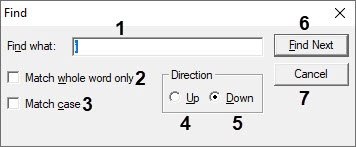
- Enter the text to find in the Find what: field (1).
- Set the Match whole word only checkbox to search for the text in whole (2).
- Set the Match case checkbox to case-sensitive search for the text (3).
- Select the direction of search through the text relatively to the current cursor position: Up (4) or Down (5).
- Click Find Next to run search or go to the next entry (6).
- Click Cancel to stop search and close the dialog box.
...
Overview
Content Tools