
Go to documentation repository


Page History
| Section | |||||||||||||||||||||
|---|---|---|---|---|---|---|---|---|---|---|---|---|---|---|---|---|---|---|---|---|---|
|
...
General object settings and the Main tab

№ | Parameter |
Method for setting the parameter value | Parameter description | Representation | Default value |
Value range | |
1 | Identification number |
Automatically | Displays the identification number of the Incident manager interface object in the system | Positive integers | - | Depends on the number of Incident manager objects in the system | |
2 | Name |
Enter the value |
into the field | Sets the name of the Incident manager object in the system | Latin, Cyrillic and service characters | Incident manager | A string containing a sequence of any characters (letters, numbers, service characters except for > and <), case-insensitive. Number of characters |
—from 1 to 60 | |
3 | Disable |
Set the checkbox | Sets the state (enabled or disabled) of the Incident manager object in the system | Boolean type |
Clear |
Set—the Incident manager object is disabled and not used |
Clear—the Incident manager object is enabled and in use | |
4 | Display |
Select the value from the list | Sets the parent Display object for this Incident manager object | Names of Display objects created in the system | Name of parent Display object | Depends on the number of Display objects in the system | |
5 | X |
|
Enter the value |
into the field | Sets the coordinate of the upper left corner of the Incident manager interface window along the horizontal X axis | % relative to screen width | - | From 0 to M*100, where M is the number of installed monitors |
Y |
Enter the value |
into the field | Sets the coordinate of the upper left corner of the Incident manager interface window along the vertical Y axis | % relative to screen height | - | From 0 to M*100, where M is the number of installed monitors |
6 | W |
|
Enter the value |
into the field | Sets the width of the Incident manager interface window | % relative to screen width | - | From 0 to M*100, where M is the number of installed monitors |
H |
|
Enter the value |
into the field | Sets the height of the Incident manager interface window | % relative to screen height | - | From 0 to M*100, where M is the number of installed monitors |
7 | Allow moving |
Set the checkbox | Allows |
changing the position of the Incident manager window manually | Boolean type | No |
Set—allow moving the Incident manager window manually |
Clear—prohibit to manually move the Incident manager window | |
| 8 | Х |
| Click the button | Opens a test window for specifying the position of the Incident manager interface window | - | - | - | |
| 9 | Monitor |
Select the value from the list | Defines the number of the monitor in the system for which the coordinates are being set | Monitor numbers in the operating system | 1 | From 1 to 16 | ||
| The Main tab | ||||||
| 10 | Incident servers | |||||
| Set the checkbox | Specifies the Incident server and Incident handler objects, the events and processing logic from which will be displayed in the interface | Boolean type |
| Clear |
Set—use the selected objects |
Clear—do not use the non-selected objects | |
| 11 | "In work" hotkey |
| Enter the value |
| into the field | A hotkey, using which the operator can start processing the event. |
To set the hotkey, place the mouse cursor in |
the field and press the required key or key combination on the keyboard |
| Keyboard keys | - | All possible keyboard keys and key combinations using Ctrl, Shift and Alt |
| 12 | Map |
Select the value from the list | The Map object, which will be linked with the Incident manager. |
| The operator can make the object with the event be highlighted on the map |
List of Map objects available in the system | - | Depends on the number of Map objects created in the system | |
| 13 | Video |
Select the value from the list | Video display mode for archive and live video | Available display methods | ActiveX | ActiveX |
—archive will open in a separate window |
Monitor |
—archive will open on the selected Surveillance Monitor |
| 14 | Maximum number of online events |
| Enter the value |
| into the field | Sets the maximum number of events that can be simultaneously displayed in the interface | Positive integers | 10 | 10-5000 |
The Group by tab

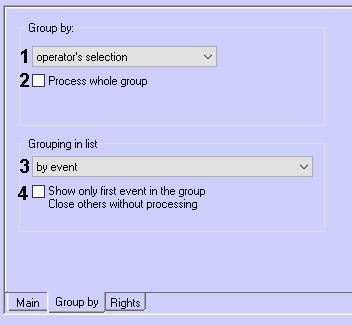
№ | Parameter | Parameter value setting methodMethod for setting the parameter value | Parameter description | Representation | Default value | Range of valuesValue range |
| 1 | Group by drop-down list | Select the value from the list | Sets the way of grouping events in the Incident manager | Available grouping methods | Operator | Operator — the —the operator can choose the grouping method in the Incident manager interface. Disabled — the —the event grouping is disabled. Region — the —the events are grouped by region. Event — the —the events are grouped by event type. Object — the —the events are grouped by object. |
| 2 | Process whole group checkbox | Set the checkbox | Sets two options:
| Boolean type | NoClear | Yes - events Set—events of the filtered group are blocked for other operators if one operator has already started processing an event from the group. When one event from a group is escalated, the whole group is escalated. No - events Clear—events of the filtered group are not blocked if the operator has already started processing an event from the group. When one event is escalated, the whole group is not escalated. |
| 3 | Grouping in list drop-down list | Select the value from the list | Specifies the option for grouping events in the event list | Available grouping methods | no grouping | no grouping - all —all events will be displayed in the event display window without grouping. If filtering is set, then all events of the selected filter will be displayed. by event - the —the events will be grouped by object type / object ID / event type / logic ID. |
| 4 | Show only first event in the group. Close others without processing checkbox | Set the checkbox | Sets the event display options within a group | Boolean type | NoClear | Yes - only Set—only the first event from the group is displayed, the rest of the events are closed without processing after the first event is processed No - all Clear—all events of the group are displayed |
The Rights tab
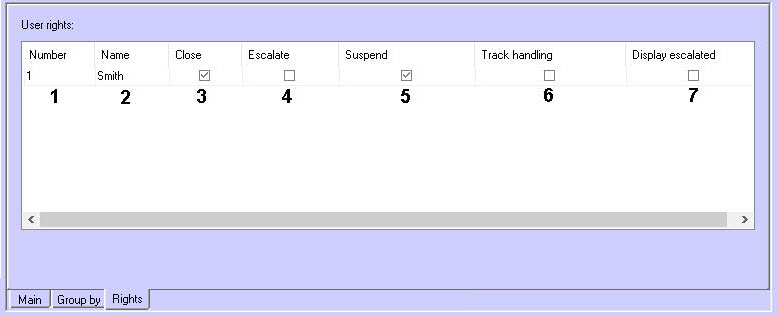

№ | Parameter | Parameter value setting methodMethod for setting the parameter value | Parameter description | Representation | Default value | Range of valuesValue range | ||||
1 | Number drop-down list | Select the value from the list | User The number of the user for whom who the rights are to should be set | Positive integers | - | Depends on the number of the users registered in the system | ||||
2 | Name drop-down list | Select the value from the list | User The name of the user (usually first or last name) for whom who the rights are to should be set. Filled in automatically when choosing selecting a user number | Names of the registered users | - | Depends on the users registered in the system | ||||
| 3 | Close checkboxTake in work | Set the checkbox | Sets the right for the corresponding user to | close the event withouttake events into processing | Boolean type | NoClear | Yes - theSet—a user can | close the event without take events into processing | No - the Clear—a user cannot | close the event without take events into processing |
4 | Escalate checkboxClose | Set the checkbox | Sets the right for the corresponding user to escalate close the event without processing | Boolean typeNo | Clear | Yes - Set—the user can escalate the close an event without processingNo - the Clear—the user cannot escalate the close an event without processing | ||||
| 5 | Suspend | checkboxSet the checkbox | Sets the right for the corresponding user to suspend the event processing | Boolean type | NoClear | Yes - theSet—the user can suspend the event processing | No - the Clear—the user cannot suspend the event processing | |||
| 6 | Track handling checkbox | Set the checkbox | Sets the right for the corresponding user to see the event handling steps taken by other users | Boolean type | NoClear | Yes - the Set—the user sees the event handling steps taken by other users No - the Clear—the user does not see the event handling steps taken by other users | ||||
| 7Display escalated checkbox | Take any | Set the checkbox | If Sets the right is given, then for the corresponding user who escalated the event will see it in the list of eventsto take into processing the events with any status | Boolean type | Clear | Set—the user can take into proccesing the event with any status Clear—the user cannot take into proccesing the event with any status | ||||
8 | Escalate | Set the checkbox | Sets the right for the corresponding user to escalate the events (give them to other users for processing) | Boolean type | Clear | Set—the user can escalate the event Clear—the user cannot escalate the event | ||||
| 9 | Work with escalated | Set the checkbox | Sets the right for the corresponding user to process the escalated events | Boolean type | Clear | Set—the user can take into processing the escalated events Clear—the user cannot take into processing the escalated | Boolean type | No | Yes - the event escalated by the user remains in the list of user events No - the event escalated by the user disappears from the list of user events |
Overview
Content Tools