The settings panel of the SIP-terminal object is shown in the pictures belowfigure.

Table describes the setting parameters of the SIP-terminal settings panel system object.
№ | Parameter | Method for setting the parameter value | Description |
Presented asRepresentation | Default value |
Range of valuesThe fieldShows Displays the identification number of the |
SIP-terminal system object |
in the system. | Sequence of numbers | - | Depends on the number of the SIP-terminal objects in the system |
.The field in Assigns a to of the SIP-terminal object in the system |
. letters and service characters | SIP-terminal | A line |
representing containing a sequence of any |
symbolscharacters (letters, digits, service characters |
apart from symbols not sensitive symbols – .The checkboxIs set with a Shows status state (enabled or disabled) of the SIP-terminal object in the system |
.-Yes – Set—the SIP-terminal object is disabled and |
is not in use.No – isn't used Clear—the SIP-terminal object is enabled and |
is in use.The dropdown listIs selected in Assigns Computer object for the given SIP-terminal object |
. | Name of the Computer objects |
. | Name of the Computer parent |
Computer object | Depends on the number of the Computer objects in the system |
.The switch switch to position| radio button | Sets the SIP-terminal type | Supported SIP-terminal types | SIP server | SIP server |
— the —the SIP-terminal acts as a server, any SIP-clients can be connected to it SIP client |
— the —the SIP-terminal acts as a client, it can be connected to any SIP-server |
The Basic settings tab.
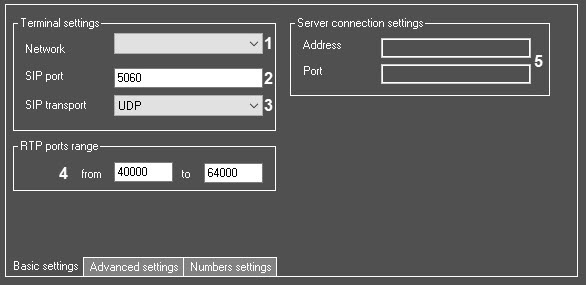
Table describes the setting parameters of the the Basic settings tab.
№ | Parameter | Method for setting the parameter value | Description |
Presented asRepresentation | Default value |
Range of valuesThe drop-down listIs selected in | Select the value from the list | Sets the IP address of the network adapter that will be used to connect to the network |
where in which the SIP-clients are located |
.-| address | Default network adapter | The list of the available network adapters of the computer |
| 2 |
The field in | into the field | Sets the port number which will receive the data from the clients via the SIP |
-clientsIntegerprotocol | Sequence of numbers | 5060 | 0-65535 |
| 3 |
The drop-down listIs selected in | the list | Sets the used transport |
level to be used. level | layer protocols | UDP | TCP UDP |
| 4 |
The | RTP ports range, from and to fields | Enter the value |
in | into the field | Sets the RTP ports range |
Integer: : The field in | into the field | For the SIP |
- client terminal type only. Sets the IP address of the SIP |
--| address | - | 1.0.0.0 - 255.255.255.255 |
The field in | into the field | For the SIP |
- client terminal type only. Sets the port for the SIP |
-Integer| Sequence of numbers | - | 0-65535 |
The Advanced settings tab.

Table describes the setting parameters of the the Advanced settings tab.
№ | Parameter | Method for setting the parameter value | Description |
Presented asRepresentation | Default value |
Range of valuesThe field in | into the field | Sets the SIP server special number |
IntegerThe field in | into the field | Sets the name of the SIP server special number | Latin, Cyrillic letters and service characters | - | A line |
representing | containing a sequence of any |
symbolsThe Numbers settings tab.

Table describes the setting parameters of the the Numbers settings tab.
№ | Parameter | Method for setting the parameter value | Description |
Presented asRepresentation | Default value |
Range of valuesThe column Lists | Displays the numbers of all devices and operators registered on the SIP-terminal, as well as special numbers |
.The fieldLists | Displays the names of the corresponding devices, operators, and special numbers |
.The field in | into the field | Sets the number or numbers to which the corresponding subscriber's calls should be forwarded to |
.Integer| Sequence of numbers | - | Numbers of all devices and operators registered on the SIP-terminal, as well as special numbers. If you want to specify several numbers, use a semicolon as a separator, for example, 234;12;0983 |
| 4 |
The sec field in | into the field | Sets the time period in seconds, during which it is necessary to wait for a response from the subscriber |
.IntegerThe checkbox | Set the checkbox | Enables a group call ( |
redirected | forwarded to several numbers) ending after one of the recipients answers | Boolean type |
NoYes – a Set—a group call is ended |
at for all recipients after the response of any operator or a device |
.No – the Clear—the group call is not ended after the answer of the first or subsequent operators and/or devices, i.e. all recipients can join the call |
.The drop-down listIs selected in | the list | Sets the Macro object which should be run when calling the subscribe |
. | Name of the Macro objects |
. | - | Depends on the number of the Macro objects in the system |
.The multicast field in | into the field | Sets the IP address for |
broadcasting | transmitting the video stream from the calling device in the multicast mode |
.-| address | - | 1.0.0.0 - 255.255.255.255 |
| 8 |
The multicast field in | into the field | Sets the IP address for |
broadcasting | transmitting the audio stream from the calling device in the multicast mode |
.-| address | - | 1.0.0.0 - 255.255.255.255 |
| 9 |
The multicast field in | into the field | Sets the IP address for |
broadcasting | transmitting the video stream from the destination device in the multicast mode |
.-| address | - | 1.0.0.0 - 255.255.255.255 |
| 10 |
The multicast field in | into the field | Sets the IP address for |
broadcasting | transmitting the audio stream from the destination device in the multicast mode |
.-| address | - | 1.0.0.0 - 255.255.255.255 |


