
Go to documentation repository


Page History
...
The settings panel of the Operator protocol object is shown in the figures.
Tables The tables below them describe the setting parameters of the settings corresponding to the elements of the settings panel of the Operator protocol.
The Filters tab

The table describes the parameters of the settings corresponding to the elements of the settings panel of the Operator protocol.
No.
specifying
Symbols
The
field
Shows
The
field
Type-in
in
Assigns
to
.
symbols
,
apart from
symbols
non
sensitive
symbols –
.
The
No
Yes –
is not in use.
No –
is in use.
The
dropdown list
Is selected in
Assigns
Display
, to which
refers.
Display
.
The
filed
Type-in
in
X
object on the screen
is
installed.
The
field
Type-in
in
Y
object on the screen
installed.
The
filed
Type-in
in
window
object
installed.
The
field
Type-in
in
window
object
installed.
The Allows hand shifting of
box
8 The X
template box
size and
The
dropdown list
in
system ID
monitor
set
IDs
the
The
event button
of
The
drop-down list
in
which are to
interface box
objects
section
.
The
drop-down list
in
on
the
are to
interface box
registered
The
drop-down list
on
the
are to
interface box
The
drop-down list
in
box
Available events
The
drop-down list
in
Yes – confirmation of the password
;
No – confirmation of the password is not
.
The
drop-down list
in
Specifies
created
created
The
field
Type-in
in
.
.
The
field
Type-in
in
.
The
field
Type-in
in
the text
format which
helping
event processing.
.
.
The
drop-down list
in
Non-negative integer
1 – 10
higher
The
field
Type-in
in
is to
object
with
The
field
Type-in
in
Type-in the
0-255
The
field
Type-in
in
the
an
.
0-255
Outside
groups
The
dropdown list
Checkbox is set
are to
created
.
The
dropdown list
in
The
dropdown list
in
displaying from the operator’s protocol.
List of available displaying
-
and live video
.
-
and live video
Surveillance Monitor.
The
for
fieldType-in
in
type becomes Not
is
0-10000
instance
specify
.
The
field
Type-in
in
Specifies
simultaneously in
Integer that is more than
The
fieldType-in
in
0-600
0 –
.
0 –
.It is possible to specify fractional values, the separator of the
part is a point
a period of
and 30 seconds
should be specified.
The
Checkbox is set
descending sorting
latest
- see
.
Yes
Yes –
.
No –
.
The
checkbox
Checkbox is set
No
Yes – a
to
No – a
added to
The
Checkbox is set
protocol
No
Yes –
No –
The Defines
Checkbox is set
No
Yes –
is to
;
No –
.
The
checkbox
Checkbox is set
auto switch
.
Yes – auto switch
No –
The
checkbox
Checkbox is set
received event tile.
No
Yes – the last received event tile
;
No –
tile
.
The Enables hiding
Checkbox is set
handling
selecting
No
Yes – event handling buttons
No – event handling buttons
The
checkboxCheckbox is set
Enables
clearing
is
No
Yes –
is processed by
;
No –
is processed by
.
The
checkbox
Checkbox is set
enlarging
alarm tile
size
No
Yes - the alarm tile
Protocol
which
;
No -
tile
.
The
checkbox
Checkbox is set
No
Yes -
Protocol
is not able to
alarms
;
No -
Protocol
.
The
Checkbox is set
always
.
No
Yes –
always
above
other
.
No –
normally.
The
Checkbox is set
No
Yes –
.
No –
operator
.
The Prohibits
Checkbox is set
No
Yes – the ability to
is disabled.
No – the ability to
is enabled.
№ | Parameter | Method for |
setting the parameter value | Parameter description |
The Filters tab
Representation | Default value |
Range of values
Value range |
1 |
Identification number |
* | Automatically |
Displays the identification number of the Operator protocol object in the system | Sequence of numbers | - | Depends on the number of the Operator protocol objects in the system |
2 |
Name |
* |
Enter the value |
into the field |
Sets the name |
of the Operator protocol object |
in the system | Latin, Cyrillic and service characters | Operator protocol | A line containing a sequence of any |
characters (letters, digits, service |
characters |
except > and < |
characters), |
case- |
insensitive. Number of |
characters—from 1 to 60 |
3 |
Disable | Set the checkbox |
Checkbox is set
Sets the status (enabled or disabled) of the Operator protocol object in the system | Boolean type |
Clear |
Set—the Operator protocol object is disabled and |
isn't used Clear— |
the Operator protocol object is enabled and |
used |
4 |
Display |
Select the value from |
the list |
Sets the Display parent |
object |
for the given Operator protocol object |
Name of the Display objects registered in the system. | Name of the Display parent |
object | Depends on the number of the Display objects in the system |
5 |
X |
Enter the value |
into the field | Sets the X coordinate in the |
horizontal axis for the upper left corner of the Operator protocol interface |
window | % of the screen width | - | From 0 to M*100, where M |
is the number of the installed monitors |
Y |
Enter the value |
into the field | Sets the Y coordinate in the |
vertical axis for the upper left corner of the Operator protocol interface |
window | % of the screen height | - | From 0 to M*100, where M is the number of the installed monitors |
6 |
W |
Enter the value |
into the field | Sets the |
width of the Operator protocol interface |
window | % of the screen width | - | From 0 to M*100, where M is the number of the installed monitors |
H |
Enter the value |
into the field | Sets the |
height of the Operator protocol interface |
window | % of the screen height | - | From 0 to M*100, where M is the number of the installed monitors |
7 |
Allow moving | Set the checkbox |
Checkbox is set
Allows moving the Operator protocol interface |
window manually | Boolean type |
No
Yes – hand shifting is allowed.
No – hand shifting is prohibited.
Clear | Set—allow moving the Operator protocol interface window manually Clear—disable moving the Operator protocol interface window manually |
| 8 | The × |
| button | Click the button | Opens a |
test window to set |
the position of the Operator protocol interface window | - | - | - |
| 9 |
| Monitor |
| Select |
| the value from the list | Sets the |
| number of the |
| monitor in the system for which the coordinates are |
| specified |
| Numbers of the monitors in |
| OS | 1 | From 1 to 16 |
| 10 |
| Add |
| events | Click the button | Opens the window for bulk adding the events |
| from an object of the selected type | - | - | - | |||
| The Filters tab | ||||||
11 | ||||||
Type |
Select |
the value from the list | Sets the type of objects |
, the events from which should be displayed in the Operator protocol |
window | Available object types | - | Depends on the objects registered |
in the system. Only the objects for which the INFORMATION or ALARM value is selected in the Messages processing column on the Events tab in the ddi.exe utility are available for selection (see The Events tab |
) |
12 |
Number |
Select |
the value from the list | Sets the number of an object |
, which |
events |
should be displayed in the Operator protocol |
window | Sequence of numbers | - | Depends on the number of |
the objects of the specified type registered in the system |
13 |
Name |
Automatically | Sets the name of an object |
, which |
events |
should be displayed in the Operator protocol |
window | Names of the objects registered in the system | - | Depends on the objects registered in the system |
14 |
Event type |
Select |
the value from the list | Sets the events displayed in the Operator protocol interface |
window |
Events available for the selected object | - | Depends on the object type |
15 |
Request password |
Select |
the value from the list | Defines the necessity of password to process the event | Boolean type | - |
Set—password confirmation is required to process the event |
Clear—password confirmation isn't required to process the event |
16 |
Region |
Select |
the value from the list |
Sets the Region object corresponding to the monitored object | List of |
the Region objects created in the system | - | Depends on the number of |
the Region objects created in the system |
17 |
Parameter |
Enter the value |
into the field | Sets the parameter of the monitored object |
Depends on the event type | - | Depends on the event type |
| 18 |
| Value |
| Enter the value |
| into the field | Sets the parameter value of the monitored object |
| Depends on the event type | - | Depends on the event type | |
| 19 |
| Help file |
| Enter the value |
| into the field | Sets the full path to |
| the text file in pdf, doc, docx, txt or other |
| format which contains the |
| help guide about the |
| event processing | File address in the file system |
| - | Depends on the file system limitations |
| 20 |
| Priority |
| Select |
| the value from the list | Sets the event priority for sorting by importance |
| Sequence of numbers | - |
1–10 The |
lower the value, the higher the priority | ||||||
| The Parameters table | ||||||
| 21 | ||||||
| Parameter |
| Enter the value |
| into the field | Sets the name of the parameter, the value of which |
should be displayed in the Operator protocol interface |
window | Latin, Cyrillic and service characters | - | Depends on the parameters sent |
| by the event |
22 |
Description |
Enter the value |
into the field |
Enter a short description of the specified parameter | Latin, Cyrillic and service characters | - |
0–255 characters | ||||||
| The Checklist table | ||||||
| 23 | ||||||
| Description |
| Enter the value |
| into the field | Sets the description of the action that the operator must perform before assigning |
| a status to |
| the event |
| Latin, Cyrillic and service characters | - |
| 0–255 characters |
| Not in the |
| group | ||||||
| 24 | ||||||
| Chief interfaces |
| Set the checkbox |
Sets the Operator protocol object, to which the events |
should be sent after the time specified in the Wait for operator response for field | List of the available Operator protocol objects in the system | - | Depends on the number of |
| the Operator protocol objects created in the system |
| 25 |
| Map |
| Select |
| the value from the list | Sets the Map interface object used to display the monitored object | List of the available Map objects in the system | - | Depends on the number of the Map objects created in the system |
| 26 |
| Video |
| Select |
| the value from the list | Sets the method of the archive and live video |
| display on the event in the Operator protocol | Available display |
| methods | ActiveX | ActiveX |
—archive |
will open in a separate window |
Monitor |
—archive |
will open on the selected Video |
surveillance monitor |
| 27 |
| Wait for operator response |
| ____ minutes | Enter |
| the value |
| into the field | Sets the time after which the event |
will be assigned the Non-processed event type or the event |
will be escalated | Min | 2.5 |
0–10000 Fractional values can be specified; integer and fractional parts are point-separated. |
For |
example, to set 2 minutes 30 seconds time period |
, enter 2.5 |
| 28 |
| Store ____ events |
| Enter the value |
| into the field |
Enter the maximum number of events that can be displayed |
simultaneously in the list of the current events | Sequence of numbers | 100 |
| Any integer starting from 0 |
| 29 |
| Delay decision making for |
| ____ minutes | Enter the value |
| into the field | Sets the time for which the operator can delay the event processing | Min | - |
0–600 The value is not specified or |
0—the operator can not delay the event processing |
Greater than |
0—the parameter sets the time for which the operator can delay the event processing |
Fractional values can be specified; integer and fractional |
parts are point-separated. For example, to set |
2 minutes |
30 seconds time period, enter 2.5 |
| 30 |
| Sort by priority | Set the checkbox |
Enables the sorting of events by priority. The |
descending sorting is performed in this order: Escalated, Alarm, Information and Standard (the last three |
event parameters can be set in the DDI file |
—see The Events tab) |
| Boolean type |
| Set |
Set—sorting by priority is enabled |
Clear—sorting by time the events are received is enabled |
| 31 |
| New events at the end |
| Set the checkbox |
Places new events at the end of the current events list | Boolean type |
| Clear | Set— |
new event is placed |
at the end of the list |
Clear—new event is |
placed at the beginning of the list |
| 32 |
| Close elsewhere | Set the checkbox |
| Decides whether to delete the event from other Operator protocols when it is processed in one of the Operator |
| protocols | Boolean type |
| Clear |
Set—when the event is processed in one of the Operator protocol, it is deleted from other Operator protocols |
Clear—when the event is processed in one of the Operator protocol, it stays unprocessed in other Operator protocols |
| 33 |
| Password for closing | Set the checkbox |
Sets the necessity to enter the password to process the event | Boolean type |
| Clear |
Set—the event processing |
must be confirmed with a password |
Clear—password is not required for event processing |
34 |
Autoswitch |
Set the checkbox |
Enables |
autoswitch to the Current events tab in the Operator protocol window when a new event occurs |
Boolean type |
No
Clear | Set—autoswitch |
is enabled |
Clear—auto switch is disabled |
| 35 |
| Autoactivation of last event |
| Set the checkbox |
| Enables the automatic activation of the cell of the event received last |
| Boolean type |
| Clear | Set—the cell of the event received last |
is automatically activated |
Clear—when the new event is received, the |
cell selected by the Operator remains active |
| 36 |
| Hide buttons for groups | Set the checkbox |
| Hides the event |
| processing buttons when |
| a group of events is selected | Boolean type |
| Clear | Set—the event processing buttons |
are displayed when a group of events is selected |
Clear—the event processing buttons are hidden when a group of events is selected |
| 37 |
| Clear comment |
| Set the checkbox | Clears |
| the comment field |
| after the event |
| has beed processed by the Operator | Boolean type |
| Clear |
Set—the comment field is automatically cleared after the event |
has been processed by the Operator |
Clear—the comment text remains in the comment field after the event |
has been processed by the Operator |
| 38 |
| Fit window size |
| Set the checkbox |
| Enables the automatic |
| resizing of the |
| cell to fit the entire Operator protocol window |
| Boolean type |
| Clear |
Set—the cell size is set equal to the size of the Operator |
protocol window area |
, that is not occupied by the event control panel |
Clear—the |
cell size is set according to the content size |
| 39 |
| Hide "Apply to all" |
| Set the checkbox |
| Disables the Apply to all button | Boolean type |
| Clear |
Set—the Apply to all button is hidden in the Operator |
protocol window, and the Operator |
cannot process all |
events at once |
Clear—the Apply to all button is available in the Operator |
protocol window |
| 40 |
| Over all windows | Set the checkbox |
| Enables the Operator protocol to be displayed |
| on top |
| of all windows | Boolean type |
| Clear |
Set—the Operator protocol window is |
displayed |
on top of all |
windows |
Clear—the Operator protocol window is displayed |
in the standard mode |
| 41 |
| Comment required | Set the checkbox |
| Prevents event processing without entering a comment | Boolean type |
| Clear |
Set—the buttons for classifying the events (Alarm situation, Suspicious situation, False alarm) do not appear until the Comment field is filled |
Clear—the |
Operator can classify (process) the event without entering a comment |
| 42 |
| Single selection | Set the checkbox |
Prevents the Operator from selecting multiple events using the Shift and Ctrl keys | Boolean type |
| Clear |
Set—the Operator cannot select multiple events using the Shift and Ctrl keys |
Clear—the Operator can |
select multiple events using the Shift and Ctrl keys |
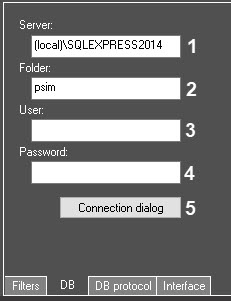
The DB tab

No.
specifying
Symbols
Range of values
The
field
Type-in
in
DB server
The
field
Type-in
in
to be
The
field
Type-in
in
user name
server
The
field
Type-in
in
server
The
button
server
| № | Parameter | Method for |
| setting the parameter value | Parameter description |
| Representation | Default value |
| Value range |
1 |
Server |
|
Enter the value |
into the field | Sets the name of |
the database Server, in which the required database is stored | Latin, Cyrillic and service characters | Name of the Server used by the system | - |
2 |
Folder |
|
Enter the value |
into the field | Sets the name of the database, in which the events are |
stored | Latin, Cyrillic and service characters | Name of the main database used by the system | - |
3 |
User |
Enter the value |
into the field | Sets the |
username for authorization in the database |
Server | Latin, Cyrillic and service characters | - | - |
4 |
Password |
Enter the value |
into the field | Sets the password for authorization in the database |
Server | Latin, Cyrillic and service characters | - | - |
5 |
Connection dialog |
| Click the button | Opens the dialog box of the database |
Server connection | - | - | - |
The DB protocol tab
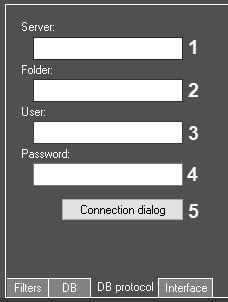
No.
specifying
Symbols
Range of values
The
field
Type-in
in
DB server
Protocol
Protocol
The
field
Type-in
in
Protocol
to be
of
Protocol
The
field
Type-in
in
user name
Protocol
server
The
field
Type-in
in
Protocol
server
The
button
Protocol
server connection
| № | Parameter | Method for |
| setting the parameter value | Parameter description |
| Representation | Default value |
| Value range |
1 |
Server |
|
Enter the value |
into the field | Sets the name of |
the database Server, in which the required Event |
Viewerdatabase is stored (if extracted to a separate DB) | Latin, Cyrillic and service characters | Name of the Server used by the Event |
Viewer database (if extracted to a separate DB) | - |
2 |
Folder |
Enter the value |
into the field | Sets the name of the Event |
Viewer database (if extracted to a separate DB), in which the events are |
stored | Latin, Cyrillic and service characters | Name |
of the Event |
Viewer database (if extracted to a separate DB) used by the system | - |
3 |
User |
Enter the value |
into the field | Sets the |
username for authorization in the Event |
Viewer database Server (if extracted to a separate DB) |
Latin, Cyrillic and service characters | - | - | |
4 |
Password |
Enter the value |
into the field | Sets the password for authorization in the Event |
Viewer database Server (if extracted to a separate DB) |
Latin, Cyrillic and service characters | - | - | |
5 |
Connection dialog |
Click the button | Opens the dialog box of Event |
Viewer database Server connection (if extracted to a separate DB) |
- | - | - |
The Interface tab
No.
specifying
Symbols
Range of values
The
drop-down list
in
event tile
The field
text
Type-in
in
custom
processing
No
0-255
The field
text
hot keys
alarm
processing
No
It is allowed to
A shortcuts
are not
The
drop-down list
in
a way
Operator
: the operator
Full:
.
Simple:
strings
.
The
drop-down list
in
a way
Operator
: the operator
.
Default: the
.
Object:
.
Event:
type.Region:
region.
| № | Parameter | Method for |
| setting the parameter value | Parameter description |
| Representation | Default value |
| Value range |
| 1 |
| Frame |
| Select |
| the value from the list | Sets the frame color of the active |
| cell | Color palette | Black | RGB color |
| 2 |
| Name |
| * |
| Enter the value |
| into the field | Sets the |
| names for the alarm |
| assessing buttons | Latin, Cyrillic and service characters |
| - |
| 0–255 characters |
| 3 |
| Keyboard shortcut |
| * | Press the key combination | Sets the |
| key shortcuts for the |
| events |
| assessment | Keyboard combinations |
| - | You can |
| combine the Ctrl, Alt and Shift keys with any other keys on the keyboard. For example, the Ctrl+Shift+Alt+A or the Ctrl+ |
| A shortcuts are allowed, but the D+A or D+Ins shortcuts |
| are not allowed, etc. |
| 4 |
| View |
| Select |
| the value from the list | Sets |
| the option of displaying events on the Current events tab | Available display options |
| operator | operator—the Operator |
can choose a full or a simple view. |
full—the events are displayed as cells with screenshots |
simple—the events are displayed as |
lines without screenshots |
| 5 |
| Group by |
| Select |
| the value from the list | Sets |
| the option of grouping events on the Current events tab | Available grouping options |
| operator | operator—the Operator |
can choose the grouping options |
default—event grouping is disabled |
object—the events are grouped by object |
event—the events are grouped by event |
types region—the events are grouped by |
regions |
* The field names marked with the asterisk * are not displayed on Name of the element isn't displayed in the settings panel of the given object.
Overview
Content Tools