
Go to documentation repository


Page History
For the Additional workplaces software operation, it is necessary to configure the list of additional workplaces in the Server of Of Control, and specify the computer name and client code for each of them.
...
The list of Additional workplaces that can be connected to the Server of Of Control is configured as follows:
- Go to the settings panel of the Server of Of Control object.

- Click the Monitoring PSIM… Monitoring… button (1). As a result, the box for configuring the list of Additional workplaces appears.
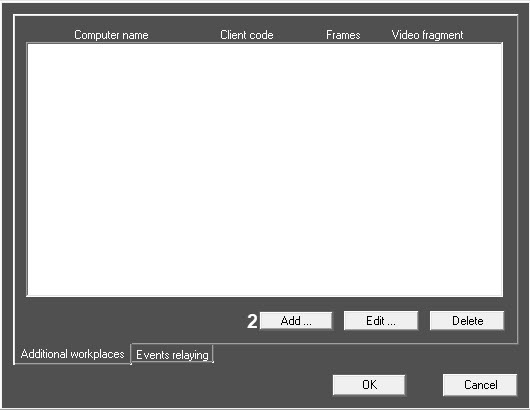
- To add an Additional workplace to the list, click the Add… button (2).
- In the appeared box specify the computer name on which the Additional workplace is installed (1).
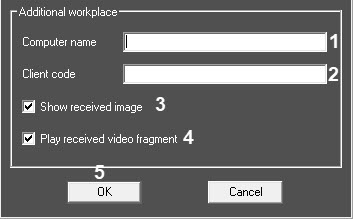
- Specify the client code in the Client code field (2).
- To show the received image, select the corresponding checkbox (3).
- To play the received video fragment, select the corresponding checkbox (4).
- Click the OK button (3)5) to save changes and return to the window for configuring the list of Additional workplaces.
Repeat steps 3-6 8 for all Additional workplaces that will be connected to this Server of Of Control.
Info title Note. To edit specified settings select the Additional workplace in the list and click the Edit… button.
To delete the Additional workplace in the list select it in the list and click the Delete button.- Click the OK button to save changes and return to the settings panel of the Server Of Control object.
- Click the Apply button.
The list of Additional workplaces is now configured.
Overview
Content Tools