
Go to documentation repository


Page History
...
Audio calls are supported between operators in a distributed configuration on the Server Of of Control/Agent Of of Control side. Audio calls are made using the SIP terminal object. Physical SIP devices are not required.
...
Configure audio calls from the Monitoring interface as follows:
- At the Server Of of Control and Agent Of of Control side:
- Create Audio card object with the Microphone object under it (see Audio subsystem configuration).
- Create Audio playback card object with the Speaker object under it (see Configuring audio playback).
- At the Server Of of Control side:
- Create a SIP-terminal object as a SIP server in Axxon PSIM (see Configuring SIP-terminal).
- On the basis of the SIP-terminal object, create 2 child SIP-operator objects and for each of them specify the corresponding operator identification number (Configuring SIP-operators of the Axxon PSIM's SIP server).
- On the basis of the SIP-terminal object, create the Address book object and select to use the previously created SIP operators (see Configuring address book of SIP-terminal).
- On the settings panel of each SIP-operator, select a previously created address book for use (see Configuring SIP-operators of the Axxon PSIM's SIP server).
- Create a SIP-panel 1 interface object on the same Display 1 object where the Monitoring interface object was created (see Configuring the SIP-panel interface object).
Info title Note. Recommended coordinates of the SIP panel: X = 40, Y = 40, W = 20, H = 21. - On the Basic settings tab of the SIP panel 1 object, select the SIP terminal as the terminal (see Basic settings of the SIP-panel interface object).
- On the Advanced settings tab of the SIP panel 1 object, check the boxes as shown in the figure below (see Advanced settings of the SIP-panel interface object).
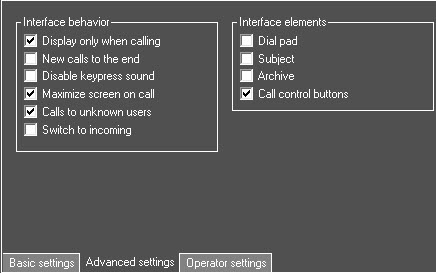
- On the Operator settings tab of the SIP-panel 1 object, configure the list of SIP-operators as shown in the figure below (see Operator settings of the SIP-panel interface object).
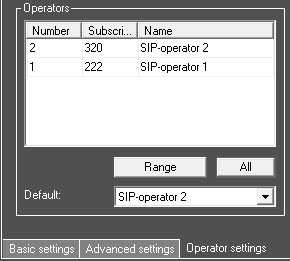
- Create the Display 2 object, which will be displayed only on the Agent Of of Control side (see Assigning the displays to the operator workstations).
- Create child interface object SIP panel 2.
- On the Basic settings tab of the SIP panel 2 object, select the SIP terminal as the terminal (see Basic settings of the SIP-panel interface object).
- On the Advanced settings tab of the SIP panel 2 object check the boxes as shown in the figure below (see Advanced settings of the SIP-panel interface object).
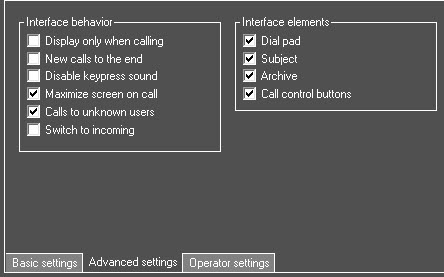
- On the Operator settings tab of the SIP-panel 2 object and configure the list of SIP-operators as shown in the figure below (see Operator settings of the SIP-panel interface object).
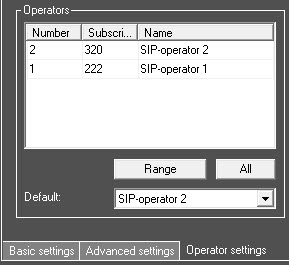
- On the settings panel of the Computer object, select the speaker and microphone of the SIP operator (see Selecting speaker, microphone and camera for SIP-operator).
...
Overview
Content Tools