
Go to documentation repository


Page History
...
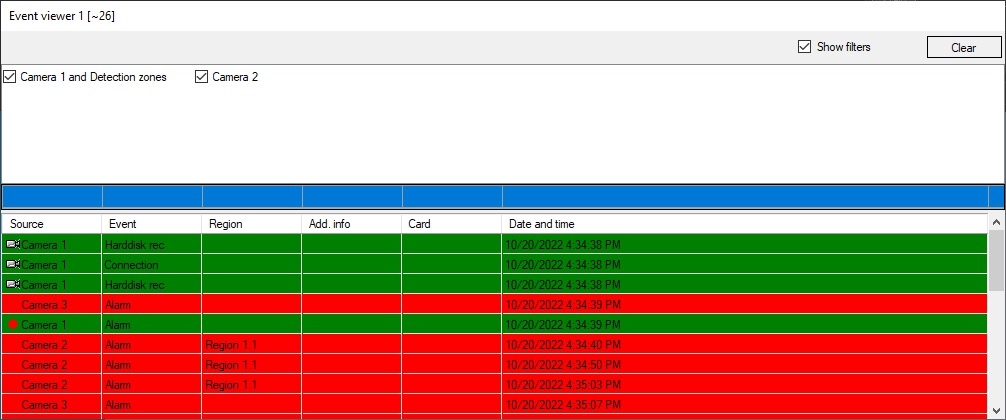
All events registered in the system or those events that match preconfigured filters are displayed in the Event viewer.
| Note | ||
|---|---|---|
| ||
A blank filter (i.e. filter with blank columns) is to be created in order to display all events for all objects in the system in the Event viewer. All events are also displayed in the Event viewer when there is no filter at all. See Configuring event filters for displaying in the Event viewer. |
...
If you delete all previously created filters, an "empty" filter will be left. When selected, it will display all events. |
Filters
The Show filters checkbox opens the list of filters configured while system setup (see Configuring event filters for displaying in the Event viewer section). To activate the filter, set the checkbox next to it's name. Several filters can be activated simultaneously. When the filter is selected in the Event viewer, only the events that match the filter are displayed. If no filter is selected, then all events for all objects in the system are displayed. Options for using filters are described in the table:
| Filter use option | Filter settings made beforehand | Result in Event viewer |
|---|---|---|
| Filter checkbox is set | Certain objects and their events are selected | Only events that match the filter are displayed |
| Several filter checkboxes are set | Certain objects and their events are selected in each of the filters | Only events that match at least one of the selected filters are displayed |
| No filter is selected (all filter checkboxes are clear) | Certain objects and their events are selected in each of the filters | Only events that match at least one of all created filters are displayed |
| "Empty" filter checkbox is set | No object or event is selected | All events from all system objects are displayed |
There are no filters created for the Event viewer in the system, there are no filter checkboxes available | - | All events from all system objects are displayed |
Filter selection and filter display setting are stored at Axxon PSIM restart, i.e. if some filters are selected and filters list is hidden, then events according to those filters are displayed in the Event Viewer after Axxon PSIM restart.
...
- The last event is marked out in the list. This can be done using the Ctrl+End or Ctrl+Home keyboard shortcuts.
- The user did not perform any actions in the interface window for 3 minutes. This time can be changed using the UserActivityTimeout registry key − see key—see Registry keys reference guide.
- The list was sorted by the new column or the filter was changed.
...
| Column name | Source | Event | Region | Add. info | Card | Date and time |
| Description | Source object of the event. Note. The information in this column is received from the objid column of the dbo.PROTOCOL table of the Axxon PSIM database. | Event name. Note. The information in this column is received from the action column of the dbo.PROTOCOL table of the Axxon PSIM database. | Conventional field (region) of the event source object location. Note. The information in this column is received from the region_id column column of the dbo.PROTOCOL table of the Axxon PSIM database. | Additional information describing the event (if any). Note. The information in this column is received from the param0 column of the dbo.PROTOCOL table of the Axxon PSIM database. | Card code for the access-related events (i.e. ACCESS_IN). Note. The information in this column is received from the param3 column of the dbo.PROTOCOL table of the Axxon PSIM database. | Date and time of the event. Note. The information in this column is received from the date column of the dbo.PROTOCOL table of the Axxon PSIM database. |
| For details about the dbo.PROTOCOL table, see Base Axxon PSIM database tables. | ||||||
...
Overview
Content Tools