
Go to documentation repository


Page History
...
It is to be taken into account that while configuring each rtsp Server loads only one CPU core. To increase the number of rtsp streams several rtsp Server objects are to be created and configured on several cameras. Each RTSP Server entity runs in a separate system process (StreamingServer.run).
| Info | ||
|---|---|---|
| ||
All the ports mentioned below are specified using only natural numbers. |
Creating the RTSP Server object
...
- Go to the Advanced settings tab.
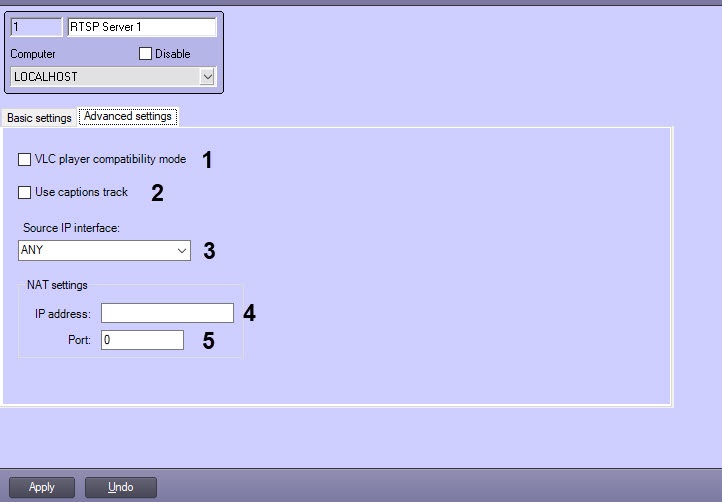
If the current time is to be sent to VLC Media Player instead of the frame time, then set the VLC player compatibility mode checkbox checked (1). This option is to be used in case of problems when playing back the archive received over RTSP in VLC Media Player.
If there are captions on the video (see Configuring captions display on a video image), set the Use captions track checkbox checked to send them along with video via RTSP Server and to display them in the receiving app – VLC player (2).
Also, when this checkbox is set, time captions are added to the video image in the format YYYYMMDDTHHMMSSZ. If the video is archive (see request examples below), then the captions show the archive time. However, if the VLC player compatibility mode is set along with the Use captions track check box, the time in the captions is current.Note title ImportantAttention! Correct video and captions operation are enabled only in VLC Media Player 2.0.0. These features are not guaranteed to work in other versions of VLC Media Player or other programs.
From the Source IP interface drop-down list, select the name of the network interface that should be used to broadcast the RTSP server (3).
If the RTSP Server is used for broadcasting the video data to the Single Data Center (ECHD), and the Video Surveillance Servers are behind NAT, then it is necessary to specify the NAT settings:
In the IP address field, specify the IP address of the router that performs the NAT broadcasting (4).
In the Port field, specify the port of the router, which is accessed by the client when executing the Single Data Center (ECHD) requests (5).
Info title Note To enable the substitution of the router's specified IP address and port to the Single Data Center Center (ECHD) requests, it is necessary to set the corresponding checkbox in the settings panel of the Web server object - see object—see Enabling the processing of ECHD requests and selecting rtsp server.
Click the Apply button to save the changes.
...
Overview
Content Tools