
Go to documentation repository
The Report by users, ' access levels and readers is is a table which that contains the information about users with the selected access levels or selected passage points readers assigned to them.
To create the Report by users, ' access levels and readers, do the following:

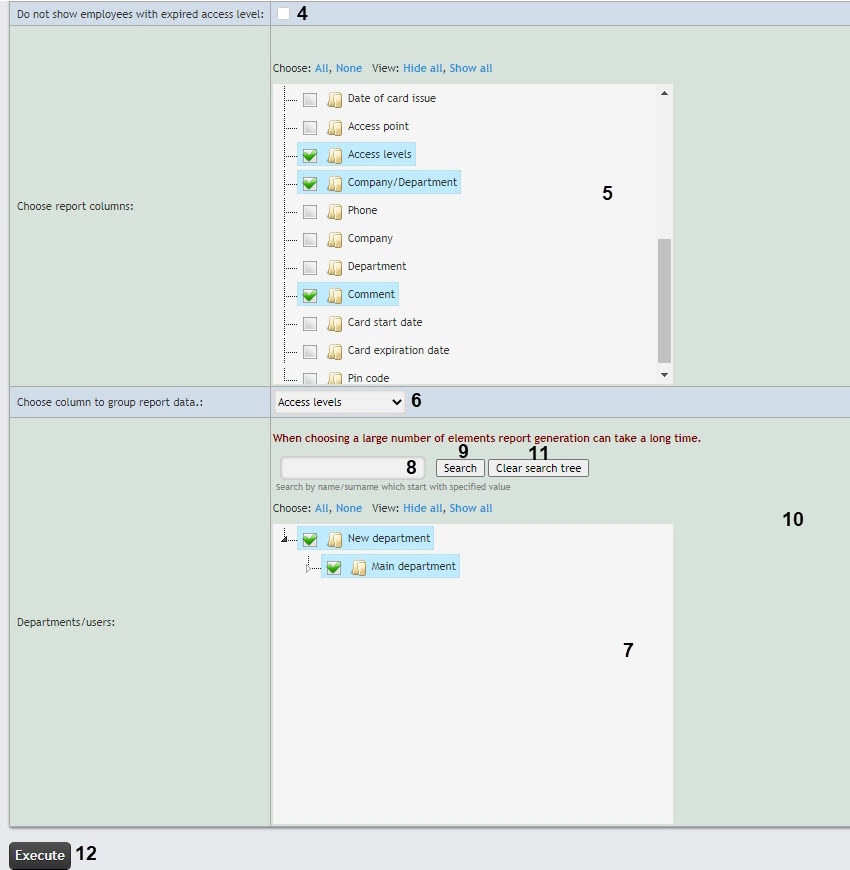
In the Choose report columns field (5), set the checkboxes next to those In the Select the columns for the report field (3), check the boxes for the columns that should be displayed in the report. You can also change the order of the columns: to do this, use the left mouse button to move left-click and hold the column name up or downand drag it higher or lower relative to other columns. Click All to select all found/available columns. Click None to deselect. Click Hide all to hide the columns structure. Click Show all to expand the columns structure.
| Info | ||
|---|---|---|
| ||
You can select up to 5 columns. |
To use the search when selecting departments or employees, in the search field (8), start entering the name of the department/the name or the surname of the employee and click the Search button (9). The found objects will be displayed in the search tree. Click the Clear search tree button (10) to clear the objects from the search tree. The search works from the first character. Click All to select all found/available departments/employees. Click None to deselect. Click Hide all to hide the departments/employees structure. Click Show all to expand the departments/employees structure.
| Info | ||
|---|---|---|
| ||
If the search tree is blank, the report is generated by the objects selected in the area 7, otherwise the report is generated by the objects selected in the search tree. |
The example of a report by readers.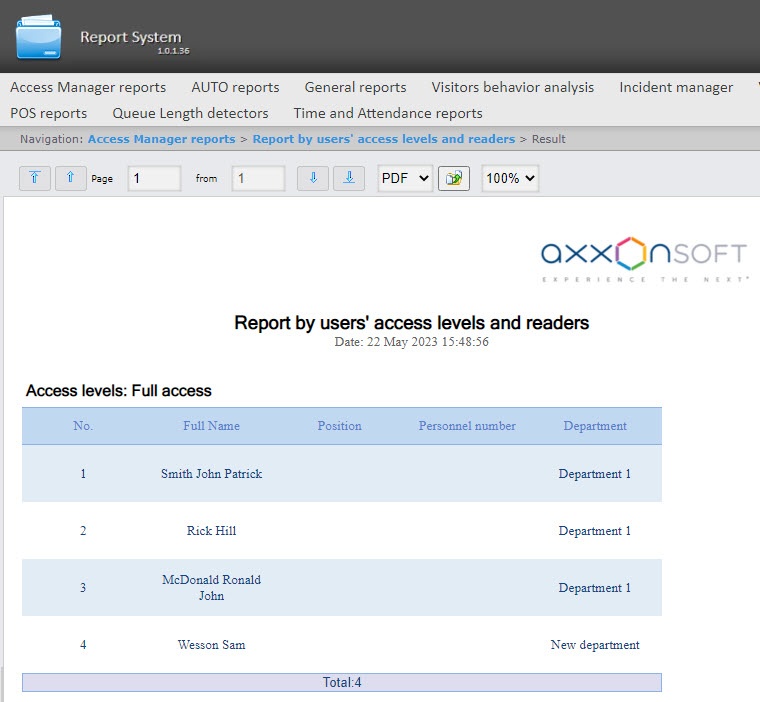 report data is grouped by the Access levels column.


All possible report fields are described in the table.
| Field name | Description |
|---|---|
| No. |
...
| Line number |
| Full |
...
| Name | Employee's full name |
...
| Name | Employee's first name |
| Surname | Employee's last name |
| Patronymic |
...
| Employee's patronymic | |
| Position | Employee's position |
| External ID | Employee's external ID |
| Personnel number | Employee's personnel number |
| License plate | Employee's car license plate number |
| Car | Employee's car |
...
| brand | |
| Card number | Employee access card number |
| Card code | Employee access card code |
| Date of card issue | Date when the card was issued to the employee |
| Access point | Access point through which the employee passed |
| Access levels | Employee access level |
| Company/Department |
...
| Company/Department where employee works | |
| Phone | Employee's phone number |
| Company | Company where employee works |
| Comment | Comment |
| Card start date | Employee's card start date |
...
| Card expiration date |
...
| Employee's card expiration date |
...
| Pin code | Employee's card PIN code |

