
Go to documentation repository


Page History
The Web-Server allows accessing Axxon One remotely over the Internet (see Working with Axxon One Through the Mobile Clients, Working with Axxon One Through the through the Web-Client).
| Note | ||
|---|---|---|
| ||
The
| ||
| Note | ||
| ||
|
To configure the Web-Server in
...
Axxon One
...
, do the following:
- Select a Server object.
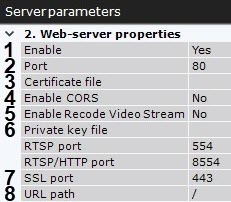
By default, the Web-Server starts automatically together with the Server. If you want to disable the Web-Server, set the value of the Enable to parameter to No (1).
In the Port field, enter the port number on which the Web-Server will be located (2).
- In the URL path field, enter the prefix that is added to the server address (3).
- To connect to a the Web-Server via the HTTPS protocol, do the following:
- Enter a port number to connect to the HTTPS Server (7).
- Specify a path to the private key file (6).
Specify a path to the certificate file (43).
Note title Attention! Axxon One supports SSL certificates in PEM format with TLS encryption v 1.2 and 1.3 and AES GCM, AES CCM and AES CBC algorithms.
The public key must be in CRT format, the private key must be in KEY format.
- Specify a path to the private key (5).
- Enter a port number to connect to the HTTPS Server (6);
If you want to enable CORS (Cross Origin Resource Sharing) in the Web-Server should use the CORS mechanism, select enable the corresponding parameter (74).
The Axxon One VMS supports the following:CORS HTTP-headers for GET and POST requests.
Preflight requests.
- If the Web-Server must transcode the stream, enable the corresponding parameter (5). By default, the Web-Server doesn’t transcode the stream, which helps to avoid unpredictable CPU load on the Server. For example, if the browser cannot playback a video in H.265 format, you must switch to a browser-supported video codec (see Real-time video surveillance in the Web-Client) or change the video codec of the camera to the video codec supported by the browser (see The Video Camera Object).
- In the URL path field, enter the prefix that is added to the Server address (8).
Click the Apply button to apply the configured parameters and restart the Web-Server.
The Web-Server is now configured and available over the Internet at the following address: http://<IP address of Axxon One Server>:<Port>/<Prefix>. For example, if the Servers IP address is 10.0.11.1, the port is 8000, and the prefix is /asip-api, then the Web-Server can be accessed at the following address: http://10.0.11.1:8000/asip-api.
| Tip |
|---|
Overview
Content Tools