
Go to documentation repository


Page History
...
- Go to the Hardware tab in the System settings dialog box.
- In the objects tree in the Hardware tab, select the Camera object, corresponding to the camera, the video image from which you want to analyze.
- Create the Tracker object on the base of the Camera object. The settings panel for the Tracker object appears on the right in the Hardware tab.
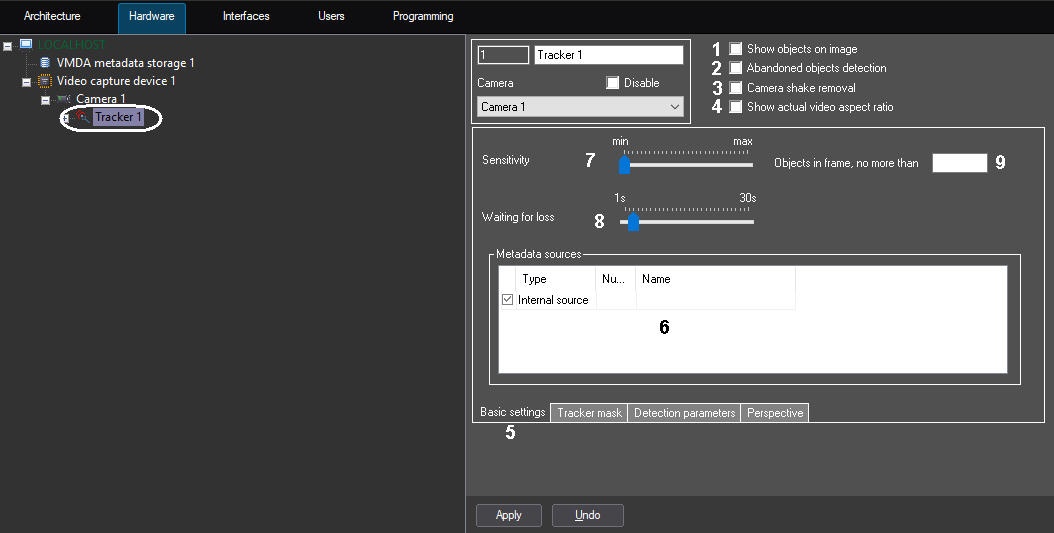
Set the Show objects on image checkbox (1), if it is necessary to frame the objects in the surveillance window. The frames are displayed on live video only, e.g. in Video surveillance monitor.
Info title Note To display the objects tracker ID, set 1 value for the DrawDetectorNumbers line parameter in the HKEY_LOCAL_MACHINE\SOFTWARE\AxxonSoft\PSIM\Video (HKEY_LOCAL_MACHINE\SOFTWARE\Wow6432Node\AxxonSoft\PSIM\Video for 64-bit system) registry.
Frame color is adjusted by the DrawDetectorColors parameter in the same registry:
- When value is 1, the frame color is the average color in the area.
- When value is 0, the frame color is white.
To allow the VMDA detectors monitor the objects abandoned in the camera FOV, set the Abandoned objects detection checkbox (2). See the The video requirements for this feature to operate are described in Video requirements to be met for abandoned object detection tool of the Tracker object operation, and the settings for VMDA detection tools are described in Creating and configuring VMDA detection.
Info title Note Customization specifics:
To ensure the operation of the Abandoned objects detection
, it is necessary to additionally configure the Abandoned Object detection tool type (see Motion in the Area detection tool configuration).
- By default, if the Abandoned objects detection option is enabled, when viewing the live video and archive video, only the abandoned objects and disappeared objects will be framed on a video image. In order for the VMDA detector to detect only the disappeared objects, or only the abandoned objects, it is necessary to change the value of the VMDA.filterGivenOrTaken and VMDA.determineGivenTaken registry keys (for details, seeRegistry keys reference guide, for more information about working with the registry, seeWorking with Windows OS registry).
title Note The function of framing the abandoned and disappeared objects on the video image is available for the standard and the converted fisheye video.
Info title Note If there is no need to monitor the objects abandoned in the camera FOV, disable the Abandoned objects detectionoption to reduce Server load. When you disable this option, you also disable the detectors configured to monitor the abandoned objects.
If the camera is installed on the moving object, set the Camera shake removal checkbox (3) to stabilize the image and reduce the error in the detector operation.
Note title Attention! When the Camera shake removal option is active, the Server load increases. - If the video in the preview window is too distorted on the Tracker mask, Detection parameters, and Perspective tabs, set the Show actual video aspect ratio checkbox (4). In this case, the video may not occupy the entire area of the preview window.
- Go to the Basic settings tab (5).
- In the Metadata sources table, set the checkboxes next to the objects used for metadata creation (6):
- Internal source. The resources of the Tracker object are used as metadata source.
Embedded detector. Metadata comes from the detectors embedded in the camera (see Embedded detectors).
Info title Note Tracks recording from the embedded detectors must be supported by the device. Furthermore, this functionality has to be integrated in Axxon PSIM.
- VideoIntellect detector. Metadata comes from VideoIntellect (see VideoIntellect embedded detector).
Set the value of the Sensitivity parameter by moving the slider to the required position (7). The value of this parameter corresponds to the minimum value of the moving object averaged brightness on which the detector will trigger only to its motion, not to the video signal noise (including snow, rain, etc.).
Info title Note If the slider is in the left end position, then the value of the Sensitivity parameter is selected automatically. Set the Waiting for loss slider into position corresponding to time when the object stops moving and is considered to be active and the detector is still tracking it (8). If the object is motionless for a longer period than the set value, then the object is considered to be lost.
Info title Note If the lost object starts moving it is considered as a new object. Info title Note Fine-tuning of the abandoned objects detection tool is performed using the registry keys (see Registry keys reference guide).
- In the Objects in frame, no more than field, specify the maximum number of objects in the frame that are detected (9). If the number of objects is equal to or exceeds the specified value, then the MD_LIMIT event is generated (see CAM section of Programming Guide). If the parameter is not set or equal to 0, this event is not generated.
...
Overview
Content Tools