
Go to documentation repository


Page History
The Audio Player window is used to operate the audio monitoring subsystem, that provides audio monitoring and recording for protected facilities.
| Info | ||
|---|---|---|
| ||
To To operate Audio Player you should plug in headphones or speakers. |
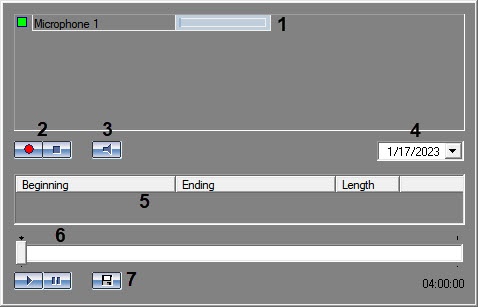
Audio Player interface:
 ,
,
where
1 − microphone 1—microphone status indicator;
2 − audio 2—audio recording buttons;
3 − microphone 3—microphone monitoring buttons;
4 − date 4—date field for reviewing audio records;
5 − list 5—list of audio records;
6 − audio 6—audio playback control panel;
7 − export 7—export audio record to file.
The Audio Player functionality enables you to:
- listen to audio on viewed camera;
- record event audio;
- playback audio recordings on triggering alarm events;
- save event audio as a standard Windows .wav file.
Overview
Content Tools