
Go to documentation repository


Page History
When you start each Servers and Clients, Axxon One automatically checks the digital signature for all executable files (exe, dll, so).
If all files are in place and match their signatures, the System integrity check passed successfully record appears in the system log (see The System Loglog).
Otherwise, you can set the system to If the integrity of system files and directories is compromised, altered by malware, or someone has attempted to hack into the system, Axxon One will automatically perform one of the pre-configured actions. To select a responsethe system response when integrity is compromised, do as followsthe following:
- Select Settings → Options → Security policy (1-2).
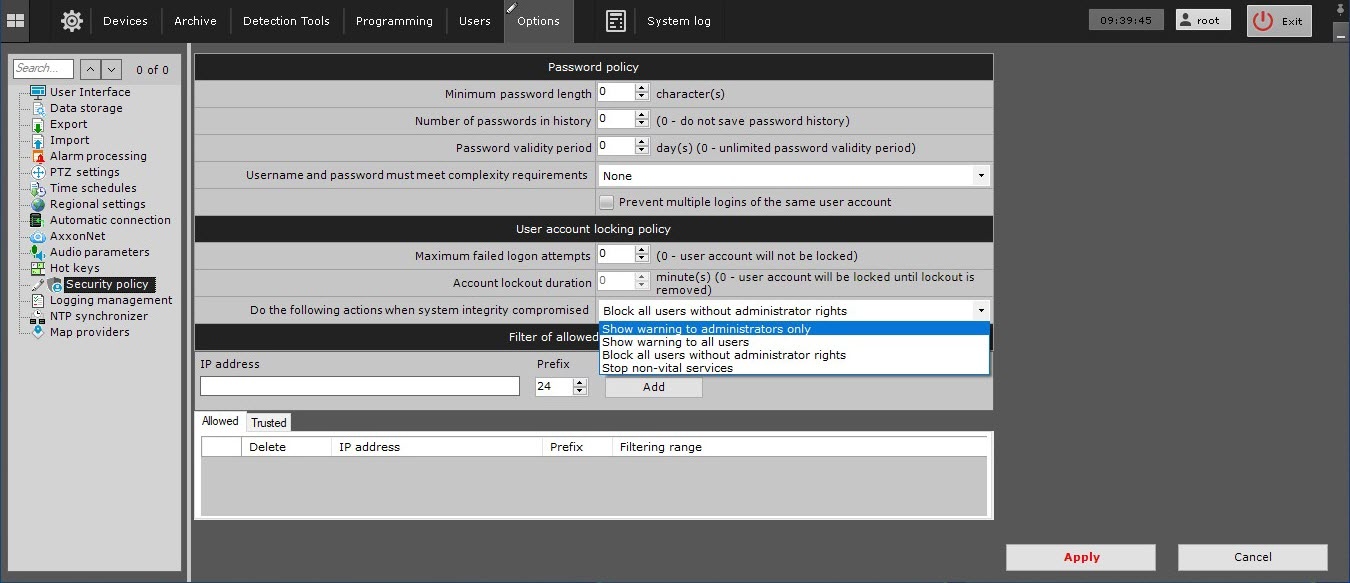
- From the Do the following actions when system integrity compromised (3) choose drop-down list, select the necessary response:− if selected,
Response Description Show warning to administrators only , an alert will be displayed for users of the admin;Users of the admin role will see a warning when the Client starts
Info title Note ; to. To continue launching the Client, click Continue
− in this case, all users will be alerted;. To quit, click No. To open a text file containing the list of compromised files, click Details.
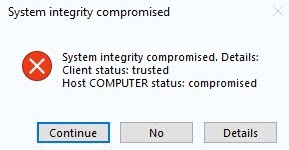
Show warning to all users − allows only users in the admin role to access the Server. For all non-administrators who were in the system at the time of the check, theAll users will see a warning Block all users without administrator rights a notificationThe Client will shut down and
;the warning will be displayed
− shuts down all systemfor all users, except for the users of the admin role. They also won’t be able to connect to the Server
Stop non-vital services videoOperation of all objects that are subject to licensing ( tools, etc.). Upon launching the Client, each user will see a notification message.cameras, detection tool, and so on) will be stopped. A warning will be displayed for all users when starting the Client Click the Apply button
Click Apply.
Overview
Content Tools