
Go to documentation repository
...
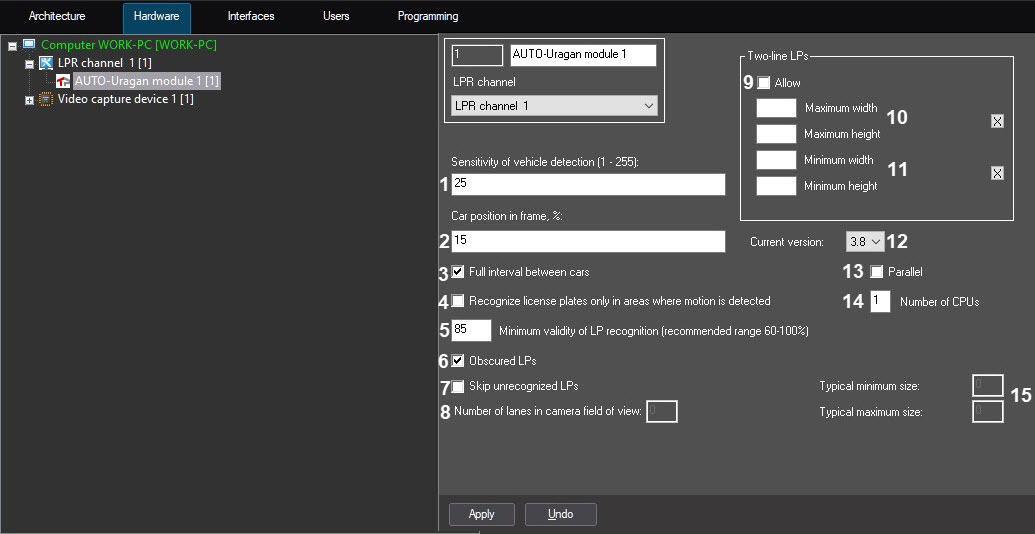
In the Car position in frame, % field (2), enter the value in percent, showing the position of a car in a displayed frame. This setting is relevant only for those cars which plates have not been recognized. If the plate has not been recognized, the module gives as a result the frame located at the specified distance from the frame with first car appearance.
| Info | ||
|---|---|---|
| ||
The moment when the car appears in the frame is considered as 0%. The moment when the car leaves the frame is considered as 100%. |
Enter the value of minimal validity of recognition in percent in the Minimum validity of LP recognition (recommended range 60-100%) field (5). Validity is defined by the degree of similarity between results of recognition and the LP template and it allows distinguishing the LP from other marks on the vehicle.
| Info | ||
|---|---|---|
| ||
The validity is displayed in the List of parameters of the Active monitor dialog box. |
 button to set these parameters. In the Two-line LPs opened dialog box, click the Stop video button when the appropriate frame appears and select the area of the required size.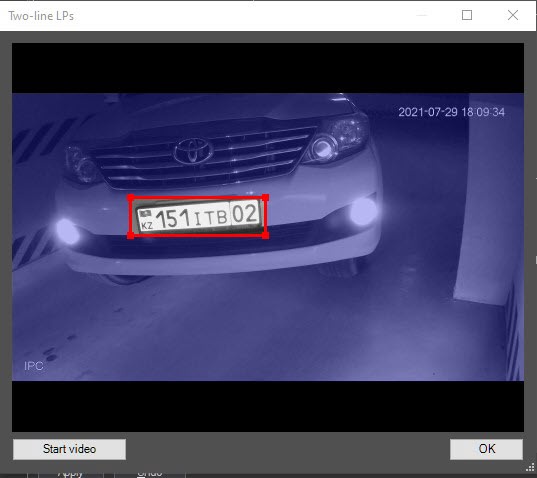
In the Current version field (12), select the SDK version of the AUTO-Uragan module. SDK version 3.8 (default) is recommended.
| Info | ||
|---|---|---|
| ||
You can also change the SDK version using the batch files (see Changing the SDK version using batch files). |
| Note | ||
|---|---|---|
| ||
After changing the SDK version, it is necessary to restart Auto PSIM to apply the changes. |
Set the Parallel checkbox (13) if it is necessary to recognize a LP number simultaneously on several processors using parallel computing, which improves the performance of the AUTO-Uragan module.
In the Number of CPUs field (14), specify the number of processors which will be used for the parallel computing, if the Parallel checkbox is set.
| Info | ||
|---|---|---|
| ||
Processors are physical and logical cores available on the Server. For example, if there are 8 cores available on the Server, and the Number of CPUs field value is set to 4, then only the cores from 1 to 4 will be involved in the LP numbers recognition. |
The typical minimum size and the typical maximum size of plates recognized by Auto-Uragan program module will be correspondingly displayed in the Typical minimum size and Typical maximum size non-edited fields (15).
| Info | ||
|---|---|---|
| ||
|
Click the Apply button to save the changes.
| Info | ||
|---|---|---|
| ||
The Current version, Parallel, and Number of CPUs parameters will be applied to all activated AUTO-Uragan software modules in Auto PSIM. |
...

