
Go to documentation repository


Page History
| Section | |||||||||||||||||||
|---|---|---|---|---|---|---|---|---|---|---|---|---|---|---|---|---|---|---|---|
|
...
|
Purpose
Event viewerViewer is used to display data on events , registered by the system (with the possibility of data filtering by event type option).
Functions
Event viewer provides has the following functions:
Showing the list of all events registered in the system.
Showing the list of events registered in the system according to the preset filter.
- Showing data on a displayed event: event source, name, section, date and time of event registration, additional information on event.
- Forming and printing a report on registered events.
- Switching to event source location on the Map location.
- Source camera video recording playback option Playing back the video from the source camera in the events log child window of the Event Viewer.
Interface description
The Event viewer window interface interface of the Event Viewer is shown in the figure.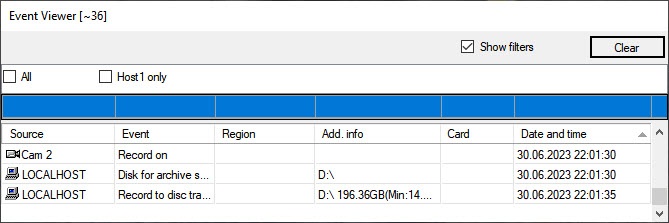
All displayed events are listed in the event table depending on the selected filters.
Column name | Comments |
|---|---|
Source | Event source object |
Event | Event name |
SectionRegion | Virtual area (sectionregion) of event source location |
Add. info | Additional information on event |
| CardCard | code Code of the card for the events related to access -related events (i.e. (for example, ACCESS_IN) |
Date and time | Date and time of event registration |
The Display filters Show filters checkbox shows displays the list of event filters created while when configuring the system (see see Configuring event filters for displaying in the Event viewer). To activate the filter, set the checkbox checked next to its name. Several filters can be activated at the same time.
Events of different types are highlighted in different colors depending on the system settings.
The icon opposite next the event source shows the extra info information on the event. For example, for the Camera event source object the following icons are used in the Event viewerViewer:
- The
 icon is displayed for the Record on disk stopped, Alarm end, Hard disk rec and Record off events.
 - The
 icon is displayed for the Alarm and Armed events.
 - The
 icon is displayed for the Disarmed event.
For every event in the table there is provided a functional function context menu , called by that you can access by right-clicking the right mouse button upon the line with the name of the corresponding event in the table. The particular content items of the functions function menu depends depend on the event source object type. For example, the function menu of the Camera type event source object functions menu is shown in the figure.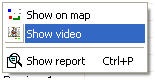
The Clear button is used to clear the list of events in the Event viewer.
| Info | ||
|---|---|---|
| ||
After the Event viewer is cleared, and if you want to display hidden events are to be displayed again, then restart Intellectis to be restarted with the the Load protocol checkbox set checked (see see Event viewer parameters). |
...
Overview
Content Tools