
Go to documentation repository


Page History
Before start searching, you must create a query is to be created.
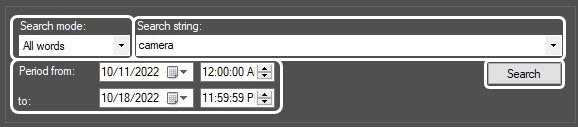
You must enter the key phrase that you want to search in the Search string field. The key phrase can include both individual words and combinations of words.
When making a key phrase for combining several elements (words and/or word phrases combinations of words), select one of the following search modes in the from the Search mode dropdown drop-down list:
- All words– —to search captions containing all elements of a key phrase (a space is a separating symbolcharacter).
- Any word– —to search captions containing at least one element of a key phrase (a space is a separating symbolcharacter).
- Substring – —to search captions containing all the key phrase elements in the specified order (the number of spaces is ignored).
* symbol can be used You can also use the * character when making a key phrase – it . It means any number of any symbols characters in a word.
Time You can set the time interval for data search is set in the the Period from and to fields.
Before searching, you are to must select captions databases captioners by setting the checkboxes next to the required captions databases captioners in the captions database state captioners status table.
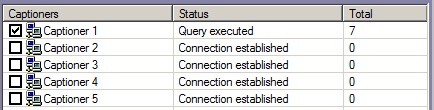
To start searchingthe search, click the Find Search button.
When the search is performed, the query status is displayed in the captioners status table of captions databases states (Query executing state (Executing query status for all selected captions databasescaptioners).
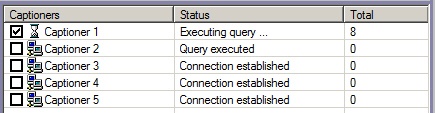
Yo You can cancel the search by clicking the the Cancel button.
When the search is complete, all transactions found in the selected captions databases captioners are displayed in the search results table.

By default, the search results by all captioners are displayed in the Total tab. Double clicking When you double-click the captioner name, the tab containing the search results for the selected captioner appearsopens.
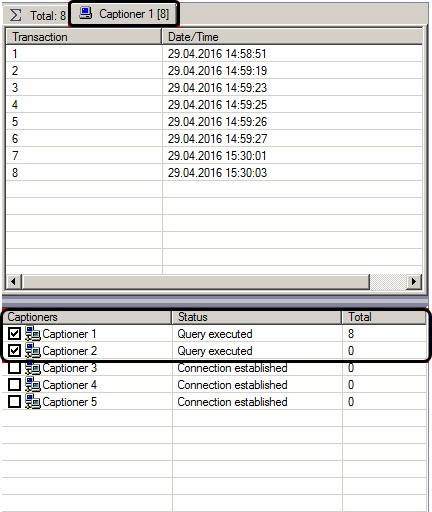
To view the search results, select the tab with the required captions database captioner and then select the required transaction in the search results table.
The corresponding captions are displayed as the text in the search results field.

| Info | ||
|---|---|---|
| ||
If in the search results there are no don't contain captions that were recorded before before Axxon PSIM reinstallation, then indexing of you must index the captions archive is to be performed. For this select Tools – Reindex menu item , in the Captioner debug window that is called by displayed when you double left-clicking click the |

The video corresponding to the selected transaction is will be displayed in the search results field.
...
Export and processing functions similar to those of the Video surveillance monitor are available in this window, including video clips export with subtitles. In particular, you can export videos with superimposed captions. For more details on using the Video surveillance monitor functions, see see Operator's Guide.
While When watching a video, the selection of caption text in the search the search results field is shifted in accordance with the time of the video archive. Transactions are not switched if the video continues to play after transaction end.
Overview
Content Tools