
Go to documentation repository


Page History
Any You can set any of the created layouts can be set as a default layout. The default layout will be displayed when you start Intellect is launched. Use the UseDefaultLayoutOnlyAtStartup registry key to display the default layout each time the corresponding screen with the Video surveillance monitor is displayed (see Registry Keys Reference Guidekeys reference guide).
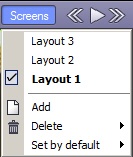
To select the default layout, right-click the desired required layout in the list and select select Set by default in the opened functional function menu.

The default layout is highlighted put in bold in the lists in the Display Manager manager and in the Video Surveillance Monitor in bold:

Overview
Content Tools