
Go to documentation repository


Page History
The Program system object is
...
used to initialize the program written in
...
the Axxon PSIM programming language
...
in Axxon PSIM and set its parameters.
The Program system object is created
...
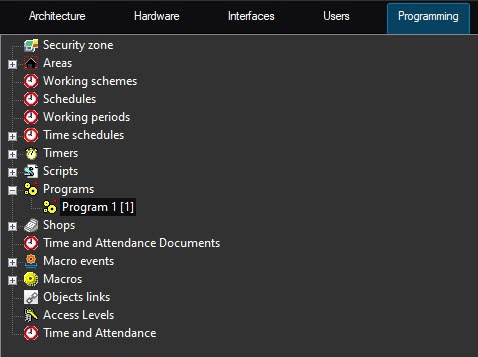
on the basis of the Programs object
...
on the Programming tab of the System settings dialog
...
window.
| Note | ||
|---|---|---|
| ||
Creation of more than 100 Program system objects can cause system instability. |
See the settings panel of the Program system object in the figure below:
...
On the settings panel of the Program system object, specify the time zone schedule of program execution and computers (cores) on which the program is to must be executed.
| Info | ||
|---|---|---|
| ||
To set all checkboxes checkednext to all computers, select one a cell in the column with checkboxes and click press Ctrl+A. To set clear all checkboxes unchecked , select one a cell and click press Shift+A. |
To pre-filter events processed by the program, set the value in the Filter field. The filter format is TYPE|ID|EVENT divided by semicolon, for example CAM||MD_STOP;CAM||MD_START to filter Alarm and Alarm end events from all Camera objects.
...
You can undo or redo some action using hotkeys in the word processor on the settings panel of the Program system object. To undo some action click , press Alt+Backspace, to redo – , press Ctrl+Y.
Overview
Content Tools