
Go to documentation repository


Page History
...
- Click the Colors button.

- In the Highlight in Highlight window, specify the line that is to must be highlighted every time it appears in the message (1).

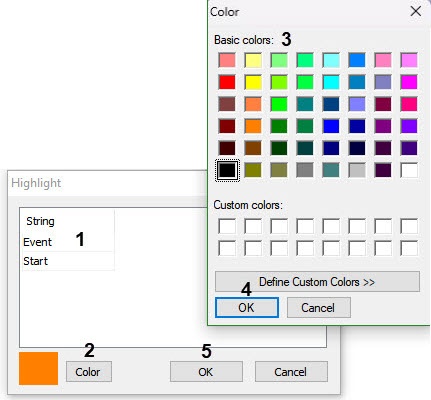
- Click the Color button (2).
- Select the color in the Color common dialog box window (3).
- Click the OK button (4).
Repeat steps 2-5 for all required lines.
Info title Note. To add a line to the table, click press the ↓ key on the keyboard. - Click the Yes button (5).
As a result, messages with the specified enterd line are highlighted will be highlighted in the specified color in the Debug window.

The messages are now highlighted.
Overview
Content Tools