
Go to documentation repository


Page History
| Section | |||||||||||||||||||||
|---|---|---|---|---|---|---|---|---|---|---|---|---|---|---|---|---|---|---|---|---|---|
|
...
To start the Editor-Debugger utility, click the Editor-Debugger button in on the settings panel of the Script system object.
...
- In the Programming tab (1) of the System settings dialog window, create the Script object (2).
- Enter the identification number and the name for the Script object (3).
- Click the Apply button (4).
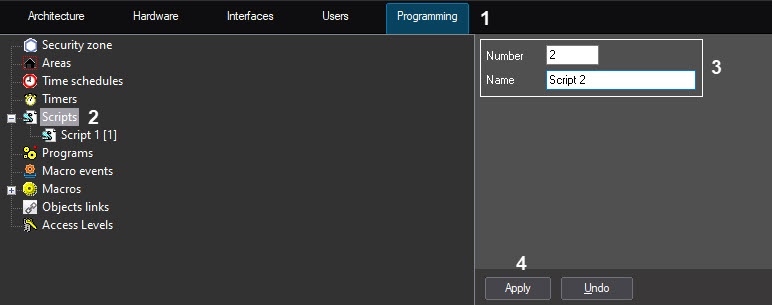
The settings panel of the Script object settings panel will open.
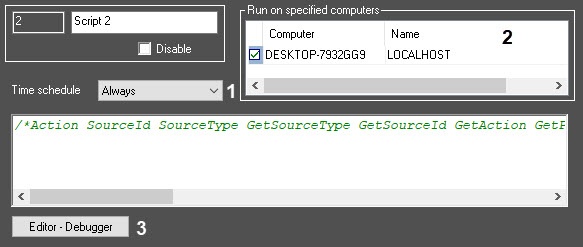
To configure the Script object, set the values of the following parameters:
In the Time schedule field (1), specify the time schedule of the script execution: Always, Never or one of the schedules created earlier (1, see Creating and configuring Time schedules). The default value is Never.
In the Computers field (2), select the computers (kernels) where on which the script should must run.
Info title Note By default, the script will run on all computers (kernels). The list displays only the computers registered in the Hardware tab of the System settings dialog window.
- Click the Apply button.
...
Click the Editor-Debugger button (3) at the bottom of the Script system object panel to open the Editor-Debuggerutility.
Info title Note Use the Editor-Debugger utility to create, edit and save scripts in JScript. The settings panel of the Script system object displays the text of the saved script that can also be edited.
- In the Editor-Debugger utility window, open the Debug-edit script list and select the Script object you want to edit (for example, the Script 1 object, as in the figure below).

In the Script field, enter the text of the script in JScript programming language (see Examples of scripts in the JScript language).
- Run the script using a test event. To create a test event, select Debug and edit → Edit test event.
The Test message window will open containing the fields for setting the event parameters.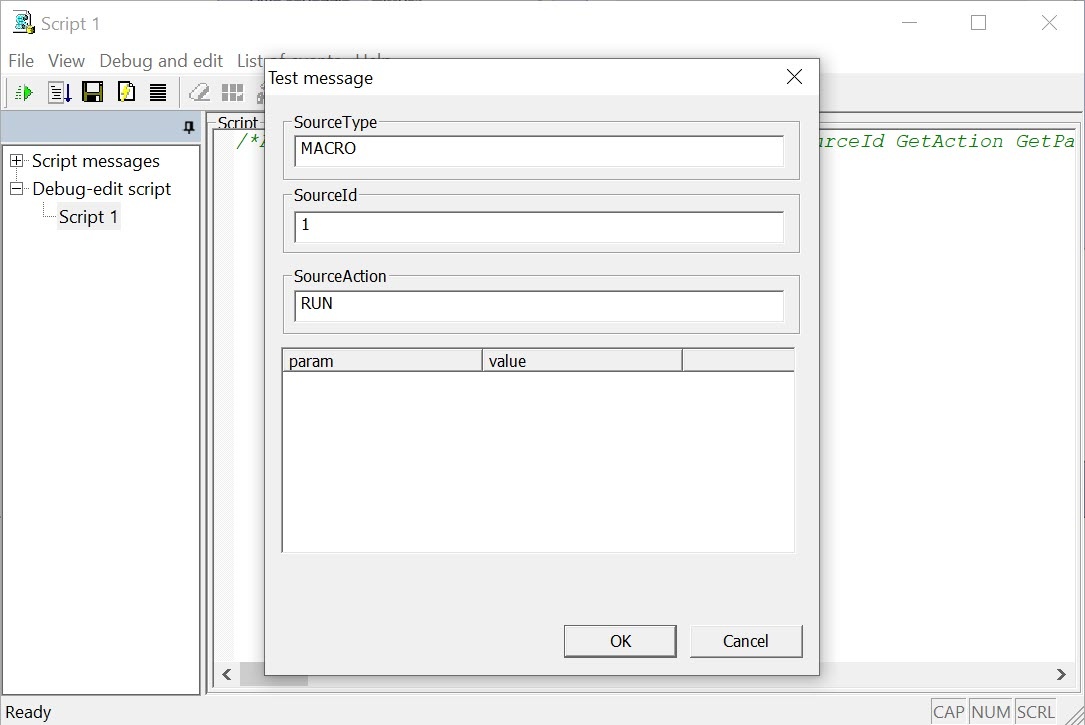
...
Features when working with a script
When working with a script in the the Editor-Debugger utility, you can undo the last action or return the last action. To undo the last action, press the Ctrl+Z key combination. To return the last action, press the Ctrl+Y key combination.
| Info | ||
|---|---|---|
| ||
For your convenience, when editing the script, the cursor position is saved when saving the script or when switching between the scripts in the Editor-Debugger utility window during a session, i.e. , it means, until Axxon PSIM is restarted. |
...
| Info | ||
|---|---|---|
| ||
When you go to the Script messages list when editing the a script, and then go back to the corresponding script in the Debug-edit script list, you cannot undo or return the last action. |
...
Overview
Content Tools