
Go to documentation repository


Page History
| Section | ||||||||||||
|---|---|---|---|---|---|---|---|---|---|---|---|---|
|
...
...
Installing the Client
| Note | ||
|---|---|---|
| ||
|
...
Add the repositories by sequentially executing the following commands:
Code Block language bash echo 'deb http://download.axxonsoft.com/debian-repository stretch backports/main' | sudo tee -a /etc/apt/sources.list.d/axxonsoft.list echo 'deb http://download.axxonsoft.com/debian-repository weekly main backports/main' | sudo tee -a /etc/apt/sources.list.d/axxonsoft.list wget --quiet -O - "http://download.axxonsoft.com/debian-repository/info@axxonsoft.com.gpg.key" | sudo apt-key --keyring /etc/apt/trusted.gpg.d/axxonsoft.gpg add - && sudo apt-get update
- If you use Ubuntu 20.04, Debian 11 or above, then install the mono-complete from the stretch repository:
Code Block language bash sudo apt-get install mono-complete -t stretch
Download the Axxon One Client installation package from the AxxonSoft website.
Install the Axxon One Client by sequentially executing the following commands:
Code Block language bash sudo dpkg -i axxon-one-client-bin*.deb || sudo apt-get install -f -y sudo dpkg -i axxon-one-client_*all.deb || sudo apt-get install -f -y
- During installation, it will be necessary to specify the maximum size of the log files in megabytes and the log level.
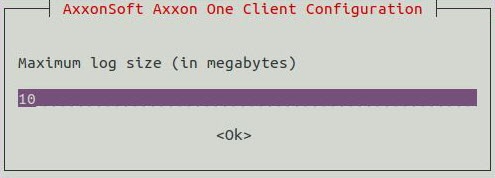
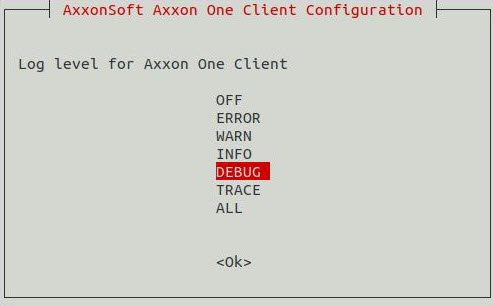
Info title Note Later you can change the specified value (see Configuring the logging parameters of the Axxon One Client in Linux OS). To do this, run the command:
Code Block language bash sudo dpkg-reconfigure axxon-one-client
...
Run the command:
Code Block language bash sudo dpkg-reconfigure axxon-one-client
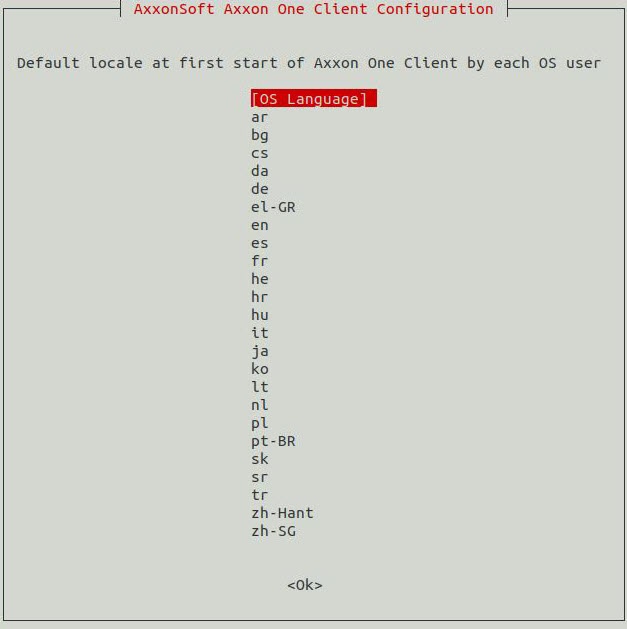
Select the required language:
Note title Attention! - This setting must configured for each OS user separately.
- For the next launches the interface language can be changed in the Client settings (see Selecting the interface language).
...
- Add repositories as described in the Installing the Client section.
- Download the set of packages required to install the Axxon One Client:
This package is included in both the regular Server package and the Failover Server packagePackage name Description Link for downloading Required packages axxon-drivers-pack_%version.number%_amd64.deb DriversPack is required for IP devices support in Axxon One
https://www.axxonsoft.com/support/downloads/drivers-pack axxon-detector-pack_%version.number%_amd64.deb Basic DetectorPack package includes only Object tracker, Tampering detection, Service detection tools and basic Motion detection
https://www.axxonsoft.com/support/downloads/detector-pack axxon-one-core_%version.number%_amd64.deb To obtain this package, contact our technical support.
Packages for installing the Axxon One Client
Note title Attention! You need to download only one of the packages: either the Server package or the Failover Server package.
Serveraxxon-one-client_%version.number%_all.deb
packageClient installation
packages
https://www.axxonsoft.com/support/downloads/axxon-one-vms axxon-one-client-bin_%version.number%_amd64.deb Failover Server installation package Additional packages axxon-detector-pack-plugin-%name%_%version.number%_amd64.deb To use additional analytics packages, select and download the corresponding packages from the Add-ons and Linux 64-bit.deb lists
https://www.axxonsoft.com/support/downloads/detector-pack - Next, go to the folder with the downloaded packages and unzip those that are presented as a zip archive.
- Install DriverPack, DetectorPack and additional packages (if available) using the following command:
where instead of /home/user/Downloads it is necessary to specify the actual path to the packages.Code Block language bash sudo dpkg -i /home/user/Downloads/axxon-d*.deb || sudo apt-get install -f -y
Install the axxon-one-core%versioncore_%version.number%_amd64.deb package using the following command:
Code Block language bash sudo dpkg -i /home/user/Downloads/axxon-one-core*.deb || sudo apt-get install -f -y
Install the Client packages using the commands described in the Installing the Client section up to the last step.
...
Overview
Content Tools