
Go to documentation repository


Page History
The following figure shows the settings panel for of the Face Detection system object.
The Basic settings tab.:
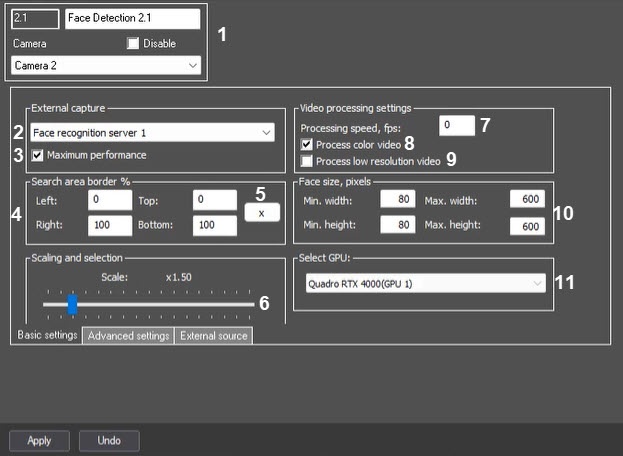
The following table provides descriptions of the parameters for configuring.Description of parameters is given in the table:
№ | Parameter | Method |
|---|
of setting the parameter value | Parameter description |
|---|
Representation | Default value | Value range | ||||
|---|---|---|---|---|---|---|
| The Settings group | ||||||
1 | ||||||
Number * field
Automatic
Identification number | Automatically | Displays the identification |
number of the Face Detection object in the system | Sequence of numbers | - | Depends on the number of Face Detection objects in the system |
Name |
Enter the value into the field | Name of the Face Detection object in the system | Latin and Cyrillic letters, |
service characters | Face Detection | A line containing a sequence of any |
characters (letters, digits, service characters), regardless of the register |
characters—from 1 to 60 |
Disable |
Set the checkbox | Sets the status ( |
enabled or |
disabled) of the Face Detection object in the system | Boolean type |
Clear |
Set—the Face Detection object is disconnected and is not in use |
Clear—the Face Detection object is connected and is in use |
Camera | Select the value from the drop-down list |
Sets the Camera parent |
object |
for a particular Face Detection object | Name of the Camera objects registered in the system | Name of the Camera parent |
object | Depends on the number of Camera objects in the system | |||||
| The External capture group | ||||||
2 | External | |||||
capture | Select the value from the drop-down list | Selects the Face recognition server object required for recognition | Name of the Face recognition server objects registered in the system | No | Depends on the number of Face recognition server objects in the system |
| 3 | Maximum performance |
| Set the checkbox | Enables the maximum performance mode | Boolean type |
| Set |
Set—the maximum quality |
of face capture and recognition is provided by using all available processor cores and increasing |
RAM |
consumption |
Clear—normal resources consumption, faces can be missed while capturing |
| The Search area border % group | ||||||
| 4 | Left, Right, Top and Bottom | |||||
| Enter the value into the field | Sets the border of the face search area |
in the video |
as a percentage of the corresponding sides of the |
frame |
Note. Setting the face search area border is available only if VA or VideoIntellect 1.1 face recognition module is used |
The percentage of the left, right, top and bottom sides of the frame | Left = 0 Right = 100 Top = 0 Bottom =100 | From 0 to 100 | |
| 5 | X button | Click the button | Sets the border of the face search area |
| in the video |
| using the interactive interface | - | - | - | |||
The Scaling and selection group | ||||||
| 6 | Scaling and selection | |||||
| Move slider bar to the required position | Sets the scale of the captured face in the frame for recording and highlighting the face with a dynamic frame | - | 1.5 | From 1 to 5 1 |
—only the captured face is recorded 5 |
—the whole frame is recorded | ||||||
| The Video processing settings group | ||||||
| 7 | Processing speed, fps | |||||
| Enter the value into the field |
| Sets the number of frames per second processed by the Face Detection module. This parameter is used to decrease the server load | Frames/sec | - | From 1 to the frequency of frames allocated for processing the video signal of each specific |
camera | |
| 8 | Process color video |
| Set the checkbox | Designed to enable/disable the conversion of color video to black and white for generating vectors from black and white frames | Boolean type |
| Set |
Set—vectors will be generated based on color frames |
Clear—color video will be converted to black and white to generate vectors from black and white frames | |
| 9 | Process low resolution video |
| Set the checkbox |
Enables processing of video images in |
320x240 |
pixels resolution by the Face Detection module | Boolean type |
| Clear |
| Set—video image is processed in the 320x240 pixel |
| resolution |
| Clear—video image is processed in the resolution set |
| for the Camera parent |
| object | ||||||
| The Face size, pixels group | ||||||
| 10 | Min.width, Min.height, Max.width and Max.height | |||||
| Enter the value into the field | Sets the minimum and maximum width and height of the face on the video image in pixels | Natural number series with zero included | Min.width =80 Min.height =80 Max.width = 600 Max.height =600 | From 0 and more |
The Advanced settings tab.:

The following table provides descriptions of the parameters for configuring.Description of parameters is given in the table:
№ | Parameter | Method |
|---|
of setting the parameter value | Parameter description |
|---|
Representation | Default value | Value range | ||||
|---|---|---|---|---|---|---|
| The Face capture area pixelization group | ||||||
1 | Pixelize area | |||||
Set the checkbox | Enables the pixelation function for the area of video image in which the face was recognized | Boolean type |
| Clear |
Set—face capture area is pixelated |
Clear—face capture area is not pixelated |
2 | Grain size |
Move slider bar to the required position | Sets the grain size of face capture area pixelation | Sequence of numbers | 5 | From 5 to 15 | ||
3 | Enable face recognition upon request | Set the checkbox | Enables face recognition upon request | Boolean type | Clear | Set—face recognition upon request is enabled Clear—face recognition upon request is disabled |

The following table provides descriptions of the parameters for configuring.Description of parameters is given in the table:
№ | Parameter | Method |
|---|
of setting the parameter value | Parameter description |
|---|
Representation | Default value | Value range |
|---|---|---|
| 1 | Combined work |
| Select the value from the drop-down list | Sets the combined operation mode with a thermal camera or an external system | List | No | No |
—combined operation mode is not used |
Combine with thermal camera temperature |
—receiving the temperature and coordinates of a captured face frame from the thermal camera. A photograph of a captured face will be obtained from the capturing camera |
Get photo from thermal camera |
—receiving the |
temperature and photos of a captured face from the thermal camera |
Get photo and |
metadata from external system |
—receiving the temperature and photos of a captured face from a thermal camera or Axxon One |
| 2 | Thermal camera reply timeout |
| Enter the value into the field | Sets the timeout for receiving data from the thermal camera Note. This setting is available only if the Combine with thermal camera temperature mode is selected | Time in seconds | 10 | >=0 |
...
Overview
Content Tools