
Go to documentation repository


Page History
Tag&Track functionality depends on the PTZ mode that is specified in the settings 기능은 설정에서 지정된 PTZ 모드에 따라 달라집니다.
| Note | ||
|---|---|---|
| ||
If manual or control priority mode is selected, for Tag&Track Pro you must activate object tracking in the viewing tile of the overview camera (see the 객체 추적 section). | ||
수동 또는 제어 우선 모드를 선택한 경우 Tag&Track Pro의 경우 개요 카메라의 보기 타일에서 객체 추적을 활성화해야 합니다 (객체 추적 섹션 참고). |
자동 모드를 선택하면 PTZ 카메라가 모든 활성 객체를 추적합니다. 이 경우 PTZ 카메라는 지정된 지속 시간으로 각 객체 간에 초점을 전환합니다If automatic mode is selected, the PTZ camera will track all active objects. In this case the PTZ camera switches focus between each object with the specified dwell time.
Info title Note The PTZ camera is positioned so that the moving object is in the center of the frame.
- In manual mode, the PTZ camera tracks an object only after the object is manually selected in the viewing tile (left-click to track). If you click anywhere in overview camera's FOV that contains no tracks, the PTZ camera cancels object tracking and focuses on the specified point.
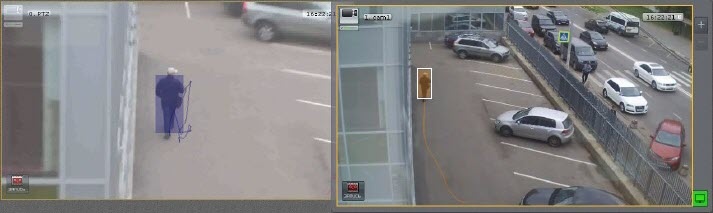
- If control priority mode is selected, the PTZ camera automatically tracks an object until another object is manually selected for tracking in the viewing tile. If an object is deselected (by clicking again) or if it leaves the field of view of the PTZ camera, automatic mode is re-activated.
PTZ 카메라는 움직이는 객체가 프레임 중앙에 오도록 배치됩니다.
- 수동 모드에서 PTZ 카메라는 뷰잉 타일에서 객체를 수동으로 선택한 후에만 객체를 추적합니다(추적하려면 왼쪽 클릭). 추적이 없는 오버뷰 카메라의 FOV에서 아무 곳이나 클릭하면 PTZ 카메라는 객체 추적을 취소하고 지정된 지점에 초점을 맞춥니다.
- 제어 우선 모드가 선택된 경우 PTZ 카메라는 뷰잉 타일에서 추적을 위해 다른 객체를 수동으로 선택할 때까지 객체를 자동으로 추적합니다. 객체가 선택 해제되거나(다시 클릭) PTZ 카메라의 시야를 벗어나면 자동 모드가 다시 활성화됩니다.
PTZ 카메라가 수동 모드인 경우, 사용자는 화면이나 조이스틱/CCTV 키보드로 제어합니다. 사용자가 PTZ 카메라를 작동하지 않는 경우(PTZ 제어판 숨겨), 자동 모드가 사용됩니다If the PTZ camera is in manual mode, the user controls it with on screen or with a joystick / CCTV keyboard. If the user does not operate the PTZ camera (PTZ 제어판 hidden), then the Automatic mode is used.
| Info | ||
|---|---|---|
| ||
Tag&Trac Pro cannot be used with the Pro는 OnScreen PTZ mode simultaneously (see 모드와 동시에 사용할 수 없습니다 (OnScreen PTZ 모드에서 PTZ 비디오 카메라 제어 참고). |
Overview
Content Tools