
Go to documentation repository


Page History
...
The buttons for managing the layouts:
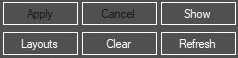
- Apply - save —save changes in the layout.
- Cancel - cancel —cancel changes and go to the last saved layout.
- Show - display —display the selected layout on the selected Video surveillance monitor without saving itmonitor. The layout is shown in its last saved version and only if it needs to be displayed on the Computer selected for screen activation.
- Clear - remove —remove all cameras from the layout.
- Refresh - refresh —refresh the frames in the camera preview windows on the layout.
- Layouts - select —select a standard layout from the list:
...
Overview
Content Tools