
Go to documentation repository


Page History
...
Client is a computer on which Axxon PSIM is installed with the Remote Monitoring Workstation (Remote Client) installation type.
Starting the Client
...
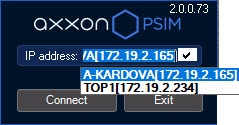
To start a search using another IP address or DNS name, enter the required address or name in the IP-address field and click the Registration Connect button. As soon as you click the Registration Connect button, the system will start searching for the active program kernel at the specified address.
If it is provided by the settings, a drop-down list with the last IP addresses used for the connection will be displayed and you will be able to select one of them:

If the active program kernel is found at the given IP address or DNS name, the system will automatically connect to the found program kernel. If required, a login and password will be requested to access the server part of the program.
After you entered the loging login and password, click the Registration button. If connection is established successfully, the user interface of the Client will be downloaded. Otherwise, the system will request the credentials again.
Overview
Content Tools