
Go to documentation repository


Page History
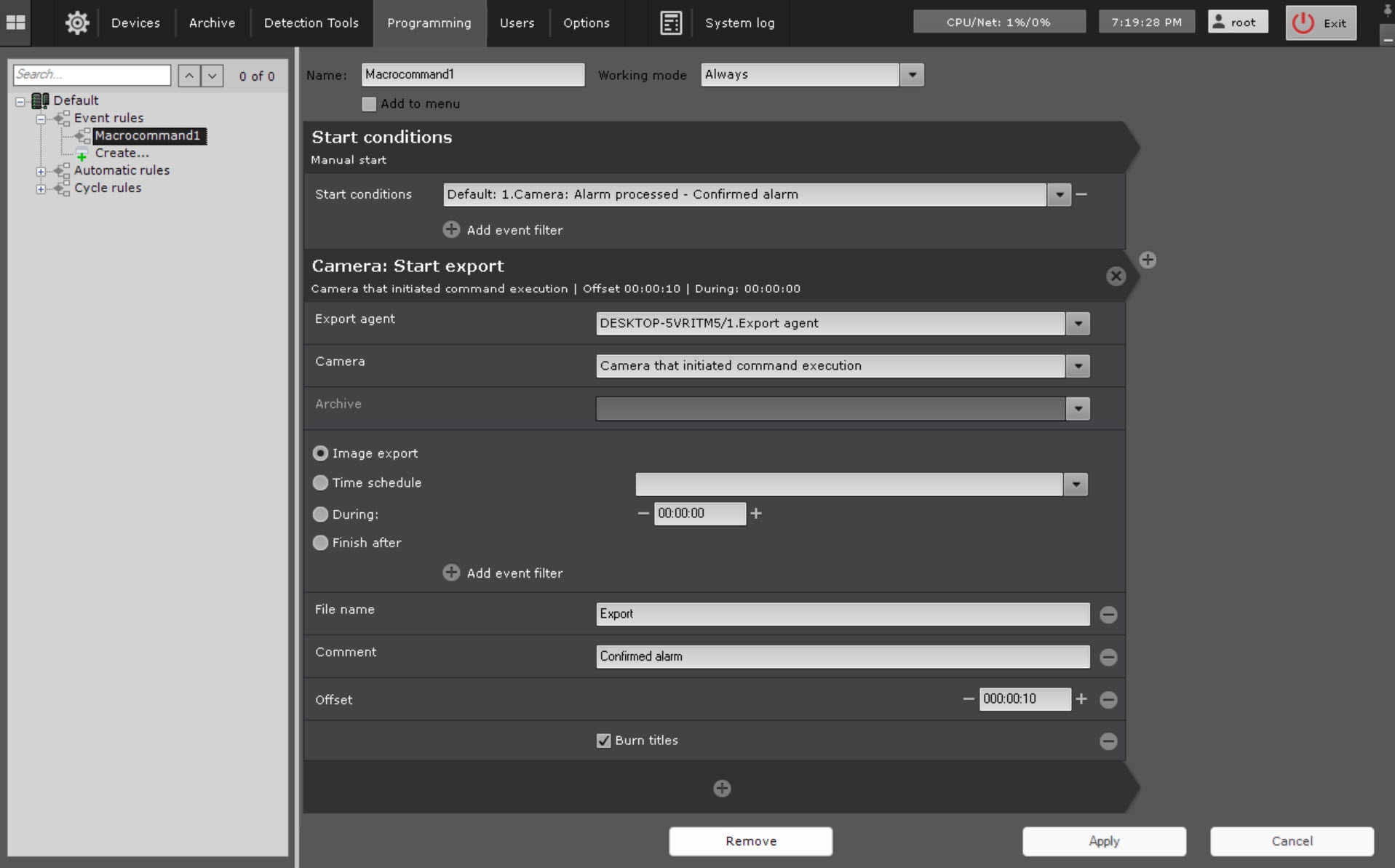
This action starts the export of a snapshot frame or a video. You must configure the conditions to start a macro beforehand (see Configuring filters for event-driven macrosstart conditions).
To configure, set up the following parameters:
- Export agent (1)—select the Server (formally the Export agent object) to which you want to export the video recording (see Configuring Export agent).

Camera (2)—select a camera for , the video from which you want to export. An implicit selection of a video camera is also allowed—Camera that initiated command execution (see Configuring start conditions).
Note title Attention! If the start of the macro was triggered by the activation of an event from an input or output (see Configuring start conditions for event-driven macros) that is not connected to any camera, you need to select a specific camera here. If you select a group of cameras or a camera that triggered initiated the command, the action will not doesn't start.
- Archive (3)—select an archive for , the video from which you want to export.
Set the export interval (4).
Option
Description
Image export
Exports a snapshot frame with the time stamp identical to the start time of an action.Important
Attention! The image cannot be exported if the video camera does not have an archiveTime schedule
You need to select a time schedule.
Exports images from within the time schedule. Video recording interval Interval of the exported video − [Beginning beginning of the specified time slotschedule; the end of the specified time slot]schedule].
Attention! If you don't specify the offset (see step 5c), the intervals from the time schedule are taken over the last 24 hoursDuring
You must
During:
You should set the export duration in HH: MM: SS. The starting point of the exported video is the command action start. End point is defined on the basis of the specified duration − (Interval interval [command action start; command action start + duration])
Finish after
Select one or more events that will trigger export stop. The , after receiving which (any of them) export is stopped. The starting point of the exported video will be is the command action start, the end point − is the moment of receiving any these events
- You can click the
 button to add additional parameters:
File name (5).
Note title Attention! You can use the following templates for file names and text comments:
- %startTime% , or [START_TIME], or {startTime}: the starting time of exported interval.
- %finishTime% , or [FINISH_TIME], or {finishTime} : the finishing time of exported interval.
You may can use the following templates for macros triggered started by a text message from an event source (see Configuring start conditions for event-driven macros):
- %startEvent%, or [START_EVENT], or {startEvent}: an event that triggered exportinginitiated export start.
- %finishEvent% , or [FINISH_EVENT], or {finishEvent}: an event that stopped the export.
Comments superimposed as captions over the exported video (6).
Offset (7) is a time period used to roll back the start time of exported video. If you set this this parameter to non-zero, the time interval of the exported video will be as follows:
[action start − (duration + offset); action start − offset].
If exported video(s) fall into a specific slot on Time time schedule, this parameter is used to define the start time for video retrieval. For example, if you set the Offset (GUI: Buffer) offset to 48 hours, all videos from the given Time time schedule slot recorded within 48 hours before the action start will be are exported.
Example: A macro command for automatically exporting video recordings of all alarm events evaluated by operators as "confirmed".
...
Overview
Content Tools